Sonatype IQ Server 209 Release Notes
Released November 3, 2026
The IQ 209 release includes multiple changes to our IQ-powered solutions. View the details in each solution’s section below.
 Improvements Impacting Multiple Solutions
This release includes the following improvements that impact multiple IQ Server-powered solutions:
Stricter Validation of SSH Repository URLs
IQ Server now validates SSH repository URLs in source control configurations, both when they are saved and when they are used. Supported formats are user@host:path and ssh://[user@]host[:port]/path. URLs may contain letters, digits, . _ ~ / + -, and %20 (an encoded space) in the path.
Upgrade Impact
Existing SSH configurations whose stored URL contains other characters (for example, other percent-encoded characters) stop working after upgrade. IQ Server logs a warning at startup that lists the affected applications and organizations. Switch those repositories to an HTTPS repository URL.
Credit Differentiation in Product License and Getting Started Pages
The Product License and Getting Started pages now display AI Developer Credits or Guide Credits instead of Licensed Credits, making it easier to identify credits associated with purchased add-ons.
 Sonatype Lifecycle
This release includes the following changes for Sonatype Lifecycle:
New Nexus One UI Preview
Sonatype Lifecycle’s Nexus One UI provides searchable, filterable views for Applications, Violations, Components, Vulnerabilities, and Waivers, along with global search across all five. Use the Switch to Nexus One UI button to move between Nexus One and the Classic UI while keeping your place.
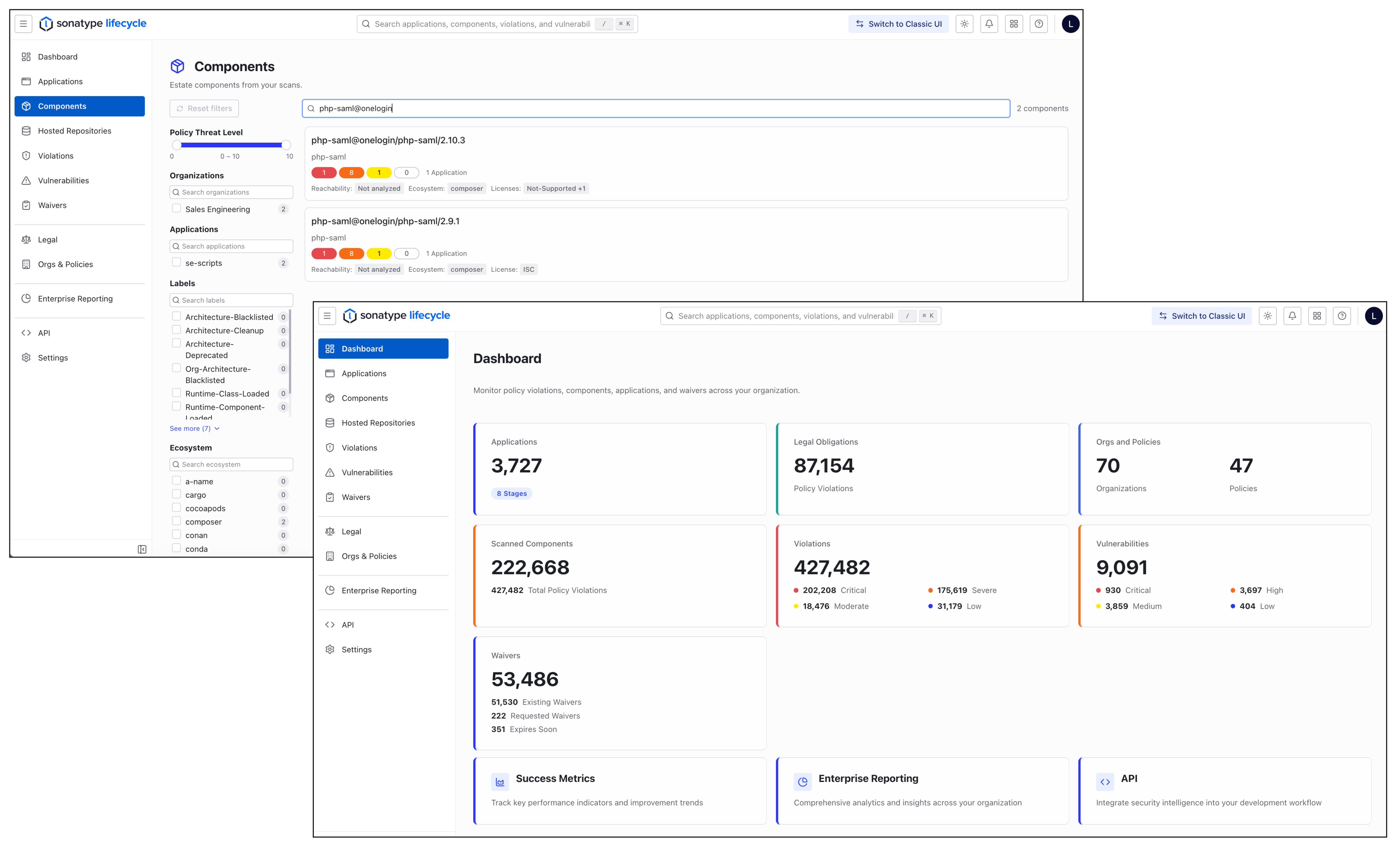 |
The Nexus One UI is in Preview, so some content may still appear in the Classic UI embedded within it. Before users can try the Switch to Nexus One UI button, an administrator must configure and build a new OpenSearch index. For full details, see the Set Up the Nexus One Index help documentation (Link Placeholder).
More Precise Auto-Waiver Expiration for Available Upgrades
Sonatype Lifecycle now provides more precise control over auto-waivers configured for Upgrade Path is not available. The new The specific waived violation is resolved mode removes the auto-waiver after a subsequent policy evaluation when an available component version resolves the specific waived Security policy violation, even if that version contains other unrelated policy violations. Previously, the auto-waiver remained in place until Lifecycle identified an available version with no policy violations. This change helps teams act on available remediation sooner without continuing to suppress a risk that can already be addressed.
New auto-waiver rules use The specific waived violation is resolved by default. Existing rules retain the previous All violations on the component are resolved behavior, so upgrades do not change how existing auto-waivers operate. You can select either mode when configuring eligible auto-waivers. See the Automated Waivers help documentation for configuration details.
Improved Dependency Visibility and Filtering in the Golden Fixes Dashboard
The Golden Versions Available for Components section in the Golden Fixes dashboard now displays the dependency type for each component, identifying dependencies as Direct, Transitive, or Undetermined. This additional information helps you better understand how components relate to your applications and make more informed decisions when evaluating recommended versions.
You can also filter the list by dependency type to focus on the components most relevant to your remediation efforts. This enhancement makes it easier to review recommended versions, prioritize updates, and streamline dependency management.
Expanded Component and Application Details in the Security Risk Breakdown Dashboard
The Security Risk Breakdown dashboard now provides additional component and application details to help you better understand security risks and evaluate remediation options. The dashboard includes information about component age, fix availability, recommended Golden Versions, and associated policy violations, giving you greater visibility into the security risks affecting your applications.
These enhancements make it easier to identify components that require attention, assess available remediation paths, and prioritize updates based on security risk and policy information.
Mythos Readiness Enterprise Reporting Dashboard Renamed to Sonatype Advanced Vulnerability Intelligence
The Mythos Readiness dashboard is now named Sonatype Advanced Vulnerability Intelligence. This new name better reflect the dashboard's purpose: helping teams identify applications with components that may be affected by privately disclosed vulnerabilities so that they can assess potential impact and prioritize remediation.
 Sonatype Developer
This release does not include any Sonatype Developer-specific changes.
 Sonatype AI Developer
This release does not include any AI Developer-specific changes.
 Sonatype SBOM Manager
This release does not include any SBOM Manager-specific changes.
 Sonatype Repository Firewall
This release includes the following changes for Sonatype Repository Firewall:
Improved Component Identification and Container Scanning Accuracy
Sonatype Repository Firewall now provides more accurate component identification for Python and Java packages, improving CVE reporting for Python packages that contain Red Hat backported security fixes. We have also expanded package detection for Go and APK packages and improved scanning accuracy for Red Hat hardened and OpenShift container images.
These improvements provide more complete visibility into components across supported environments, helping you assess security risks more confidently and prioritize remediation efforts based on more accurate vulnerability information.
Bug Fixes
Issue ID | Description |
|---|---|
FIRE-1195 | Policy-Compliant Component Selection (PCCS) now filters unknown PyPI and npm package versions from proxy index responses before clients select them for download, hiding components blocked by a Component-Unknown policy instead of advertising them and then rejecting installation with a 403. |
CLM-54826 | Advanced Search full index rebuilds now complete successfully when the existing index was written by an incompatible Lucene version, replacing the unreadable index instead of failing. |
CLM-53910 | Policy evaluation PDF report summary counts now match the application report UI: waived violations are excluded from severity totals, overall violation counts, and affected component numbers while remaining in the violations table. |
CLM-53766 | MCP batch tool responses ( |
CLM-53587 | CycloneDX SBOM imports now correctly process VEX analysis data for vulnerabilities without the optional ratings field, ensuring that component vulnerability status and analysis details are fully persisted. |
CLM-53447 | SBOM license resolution now maps SPDX identifiers to catalog licenses during scanning, including |
CLM-43911 | Go component PURLs with mixed-case module paths are now preserved with their original casing during SBOM evaluation, correcting mismatches that caused vulnerability data to go unreported; existing scan results or component hashes generated from mixed-case Go PURLs will differ from future results. |