Integrate Firewall with Zscaler
Zscaler is a cloud-native cybersecurity platform to securely connect users, devices, and applications, regardless of their location. Think of it as a security checkpoint in the cloud that all your organization's traffic can pass through for inspection and protection.
Sonatype's Repository Firewall integrates with Zscaler to block actively verified malware components from being directly downloaded from public repositories. This integration protects your organization from malware found in the shadow downloads of users bypassing your Nexus Repository.
See Shadow Downloads Best Practices
Requirements
The configuration for blocking malware is automatic once the Repository Firewall and Zscaler integration is configured.
This integration must be configured by an IQ Server Administrator user. The Zscaler requirements depend on the authentication method:
Basic Auth: For IQ Server 201 or later, the Zscaler administrator account must have the
Custom URL ManagementandOverride Existing URLspermissions. IQ Server versions 195–200 require a Zscaler account with theSuper Adminrole.OAuth: Use an active Zidentity API client configured with Secret authentication and assigned a ZIA API role that permits the management of custom URL categories.
Note
The Zscaler integration is not supported with Firewall Pro.
To complete the setup, take the following steps:
Set the URL filtering policy
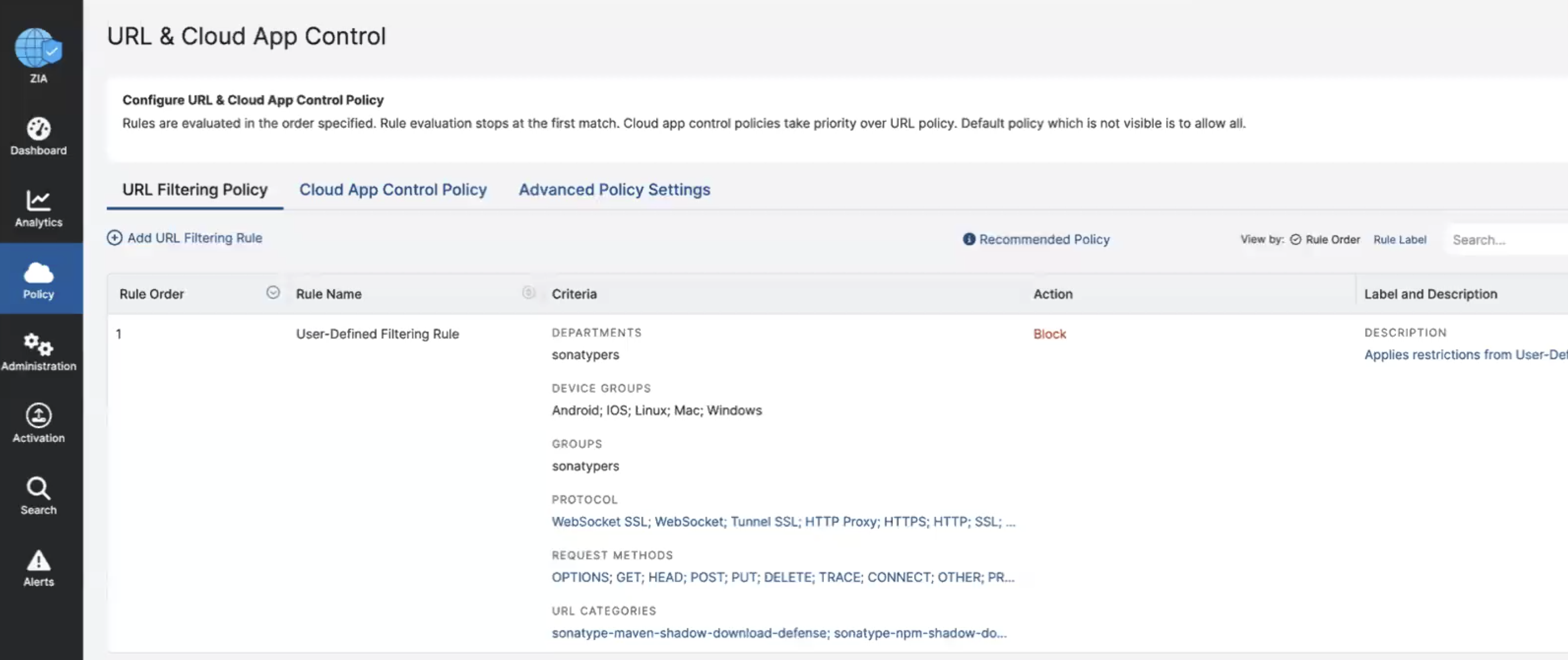
A policy must be manually added to block the verified malware components managed by the integration. Add a new URL filtering policy under the Policy → Web → URL and Cloud App Control menu.
Action: BLOCK
Groups: Credentials using the client connector
Request Methods: Accept all applicable HTTP request methods
URL Categories: The URL categories that must be blocked are added automatically by integration. The URL categories may appear in the below format.
For IQ versions before 198
sonatype-maven-shadow-download-defense
sonatype-npm-shadow-download-defense
sonatype-pypi-shadow-download-defense
sonatype-nuget-shadow-download-defense
For IQ version 198 and later
sonatype-maven-0-shadow-download-defense
sonatype-npm-2-shadow-download-defense
sonatype-pypi-1-shadow-download-defense
sonatype-nuget-3-shadow-download-defense
Note
Note that Zscaler does have a limit of up to 25,000 custom URLs or IP addresses (across all policies that use custom URLs or IP addresses), and up to 64 custom categories.
See Configuring URL Filtering Policy
Enable SSL inspection on traffic
A policy must be manually added to inspect SSL traffic coming from the client connectors to see the actual requested paths of the malware components.
Add a new URL filtering policies under the Policy → Web → SSL Inspection menu.
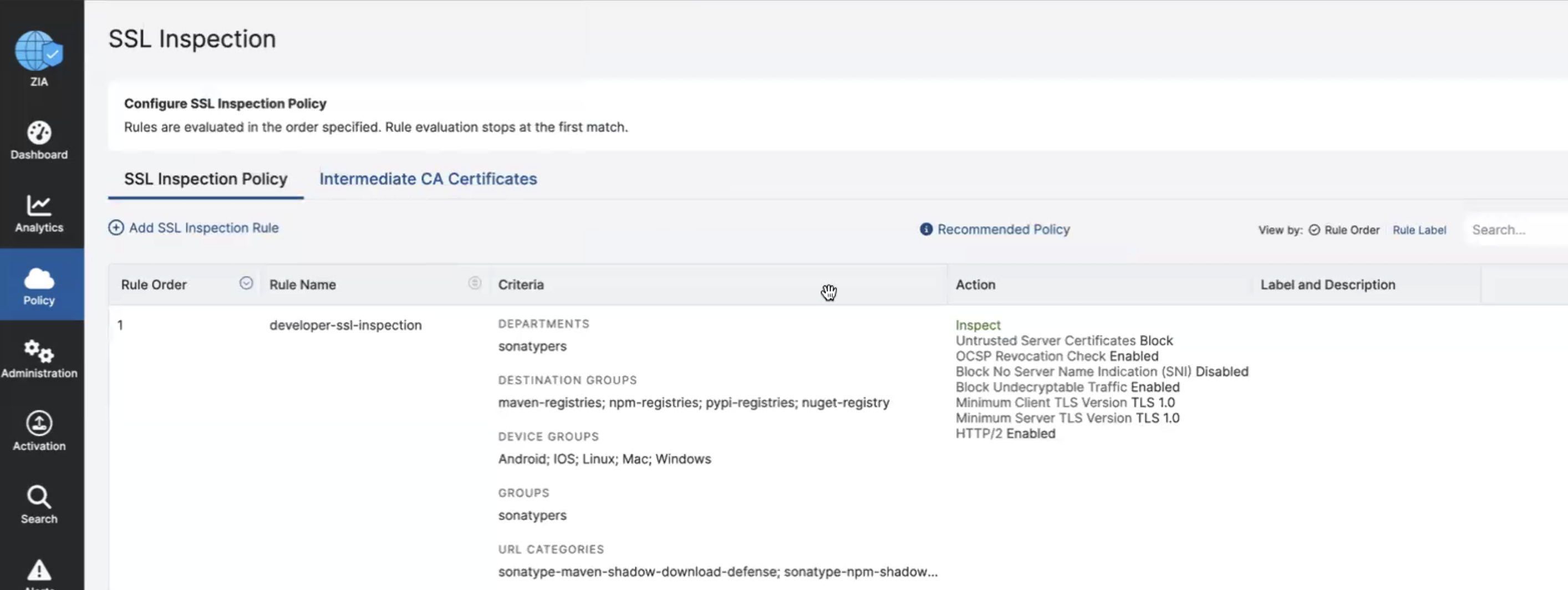
Action: INSPECT
Groups: Credentials using the client connector
Request Methods: Accept all applicable HTTP request methods
Destination Groups: Including the qualified domain names of your target format registries.
maven2-registries: repo1.maven.org, repo.maven.apache.org
npm-registries: registry.npmjs.org
pypi-registries: pypi.org
nuget-registries: nuget.org
URL Categories: Include the custom URL categories added by the integration. The URL categories may appear in the below format.
Note
Note that Zscaler does have a limit of up to 25,000 custom URLs or IP addresses (across all policies that use custom URLs or IP addresses), and up to 64 custom categories.
For IQ versions before 198
sonatype-maven-shadow-download-defense
sonatype-npm-shadow-download-defense
sonatype-pypi-shadow-download-defense
sonatype-nuget-shadow-download-defense
For IQ version 198 and later
sonatype-maven-0-shadow-download-defense
sonatype-npm-2-shadow-download-defense
sonatype-pypi-1-shadow-download-defense
sonatype-nuget-3-shadow-download-defense
Important
You must manually enable SSL inspection for any new category that a user might create.
You can see which categories have SSL enabled or disabled by opening the Edit SSL Inspection Rule modal and inspecting the list of User-Defined section of the URL Categories list.
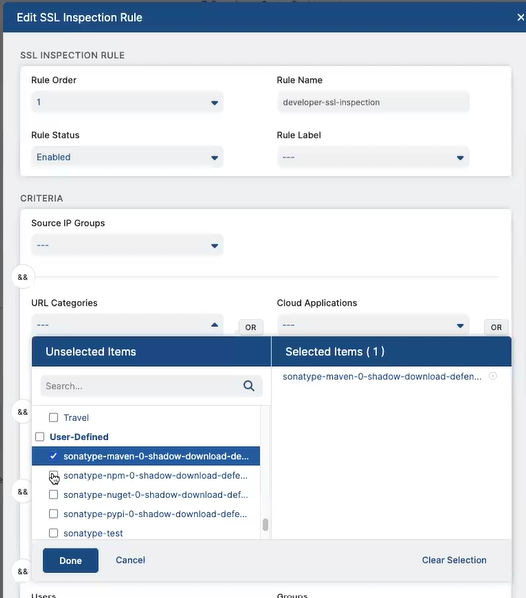
Those with the checkbox selected have SSL inspection enabled; those without a selected checkbox do not have SSL inspection enabled.
Sonatype recommends checking routinely for new user-defined categories in order to enable SSL inspection on these categories.
For more details, see About SSL Inspection
Install Zscaler certificates on your developers' machines.

Configuration
An IQ Server Administrator can configure the Zscaler integration from the settings menu for Repository Firewall.
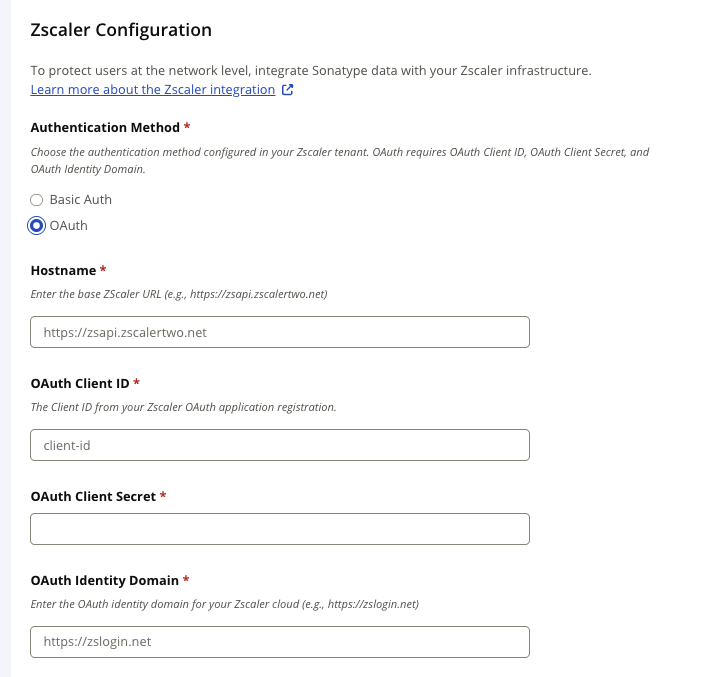
Repository Firewall supports Basic Auth and OAuth for authenticating to Zscaler. Select the authentication method supported by your Zscaler tenant.
Note
Existing Basic Auth configurations remain supported. OAuth is available for Zscaler tenants that use OneAPI/Zidentity or do not permit Basic Auth. Repository Firewall does not automatically switch or fall back between the authentication methods.
See Getting Started ZIA API in the Zscaler documentation.
Authentication Methods
Select the authentication method used by your Zscaler tenant.
Authentication Method | Required Values | Description |
|---|---|---|
Basic Auth | Username, Password, Hostname, and API Key | Authenticates with Zscaler administrator credentials and a ZIA Cloud Service API key. |
OAuth | Hostname, OAuth Client ID, OAuth Client Secret, and OAuth Identity Domain | Uses the OAuth 2.0 client credentials flow to obtain a Bearer access token from Zidentity. |
Repository Firewall displays the credential fields associated with the selected authentication method. Credentials from the other authentication method are not used if authentication fails.
Configure Basic Auth
Use a Zscaler administrator account that meets the requirements described in the Requirements section.
Select Basic Auth under Authentication Method.
Enter the Zscaler administrator Username.
Enter the Zscaler administrator Password.
Enter the ZIA API Hostname for your Zscaler deployment.
Enter the Zscaler API Key.
Select Test Configuration.
Complete the remaining Zscaler integration settings.
Select Save or Update.
For information about generating a ZIA Cloud Service API key, see Managing Cloud Service API Keys in the Zscaler documentation.
Configure OAuth
OAuth uses a Zidentity API client and does not require a Zscaler administrator username, password, or Cloud Service API key.
Create a Zidentity API Client:
Sign in to the Zidentity Admin Portal.
Go to Administration → API Configuration → OneAPI → API Clients.
Add an API client for the Repository Firewall integration.
Enable the API client.
Under client authentication, select Secret.
Generate and securely record the client secret.
Open the Resources tab.
Select the ZIA resource associated with your organization and Zscaler cloud.
Assign a ZIA resource role that permits the management of custom URL categories.
Save the API client.
Record the generated client ID.
Important
Zscaler displays the client secret when it is created. Securely record the secret before leaving the page.
For more information, see Zscaler’s Adding an API Client and Securing Internet & SaaS APIs with OAuth 2.0 documentation.
Determine the OAuth Identity Domain:
The OAuth Identity Domain combines your Zscaler vanity domain with the identity-domain suffix for the cloud hosting your tenant.
Zscaler Cloud | Identity-Domain Suffix | OAuth Identity Domain Format |
|---|---|---|
Standard or production |
|
|
Beta |
|
|
Government or FedRAMP with |
|
|
Government or FedRAMP with |
|
|
Replace <vanity-domain> with the vanity domain assigned to your Zscaler tenant.
Do not append /oauth2/v1/token to the OAuth Identity Domain. Repository Firewall adds the token-endpoint path when requesting an access token.
The Hostname and OAuth Identity Domain are different values:
Hostname: The ZIA API base URL used to manage custom URL categories. For example,
https://zsapi.zscalerbeta.net.OAuth Identity Domain: The Zidentity base URL used to obtain OAuth access tokens. For example,
https://<vanity-domain>.zsloginbeta.net.
Configure OAuth in Repository Firewall:
Select the Settings icon.
Under System Preferences, select Zscaler.
Select OAuth as the authentication method.
Enter the ZIA API Hostname.
Enter the OAuth Client ID generated for the Zidentity API client.
Enter the OAuth Client Secret generated for the Zidentity API client.
Enter the OAuth Identity Domain for your Zscaler cloud.
Select Test Configuration.
Complete the remaining Zscaler integration settings.
Select Save or Update.
Repository Firewall encrypts the OAuth Client Secret before storing it. The saved secret is not displayed in the configuration.
Note
After the configuration is saved, you must re-enter the OAuth Client Secret when modifying and saving any Zscaler configuration field.
Repository Firewall obtains and refreshes the OAuth access token as required. You do not need to configure or manually refresh the access token.
Migrate from Basic Auth to OAuth
Existing Basic Auth configurations continue to work. Migrate to OAuth when required by your Zscaler tenant or when your organization chooses to use OneAPI/Zidentity authentication.
Create and activate a Zidentity API client as described under Configure OAuth.
Record the OAuth Client ID, OAuth Client Secret, and OAuth Identity Domain.
Open the existing Zscaler configuration in Repository Firewall.
Change Authentication Method from Basic Auth to OAuth.
Confirm that Hostname contains the correct ZIA API base URL.
Enter the OAuth Client ID, OAuth Client Secret, and OAuth Identity Domain.
Select Test Configuration.
After the test succeeds, select Update.
After the next scheduled update, confirm in ZIA that the Sonatype custom URL categories were updated successfully.
There can be up to a 24-hour delay before data is sent to Zscaler. To initiate an update immediately, use the procedure under Trigger an Update to Zscaler.
Troubleshoot OAuth
Repository Firewall caches the OAuth access token according to the token lifetime returned by Zscaler. It obtains a new token before the current token expires. If ZIA returns 401 Unauthorized, Repository Firewall obtains a new token and retries the request once.
Message or Condition | Guidance |
|---|---|
| Confirm that the OAuth Client ID and OAuth Client Secret are correct and that the API client is active. Re-enter the client secret, and then select Test Configuration again. |
The OAuth server cannot issue an access token | Confirm that the OAuth Identity Domain uses |
| Verify the OAuth Identity Domain before changing permissions. Using the wrong identity-domain suffix can return this message even though it appears to indicate a ZIA role problem. |
Test Configuration reports insufficient ZIA permissions | Confirm that the API client has the correct ZIA resource and an API role that permits management of custom URL categories. |
ZIA API requests fail even though token authentication succeeds | Confirm that Hostname contains the ZIA API base URL and that OAuth Identity Domain contains the separate Zidentity domain. |
An access token expires during a synchronization operation | No configuration change is normally required. Repository Firewall automatically requests a new token. If authentication continues to fail, run Test Configuration and verify the OAuth credentials and identity domain. |
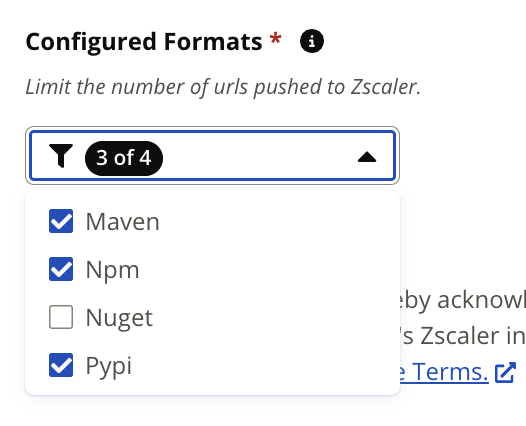
Configured Formats
Set the formats to be covered with Zscaler. Included formats use more available Zscaler custom URLs.
URL Capacity Limits
You can configure URL capacity limits to control how many Zscaler Internet Access custom URL entries the Sonatype malicious URL feed can use. These limits are separate from the custom URL quota associated with your ZIA account.
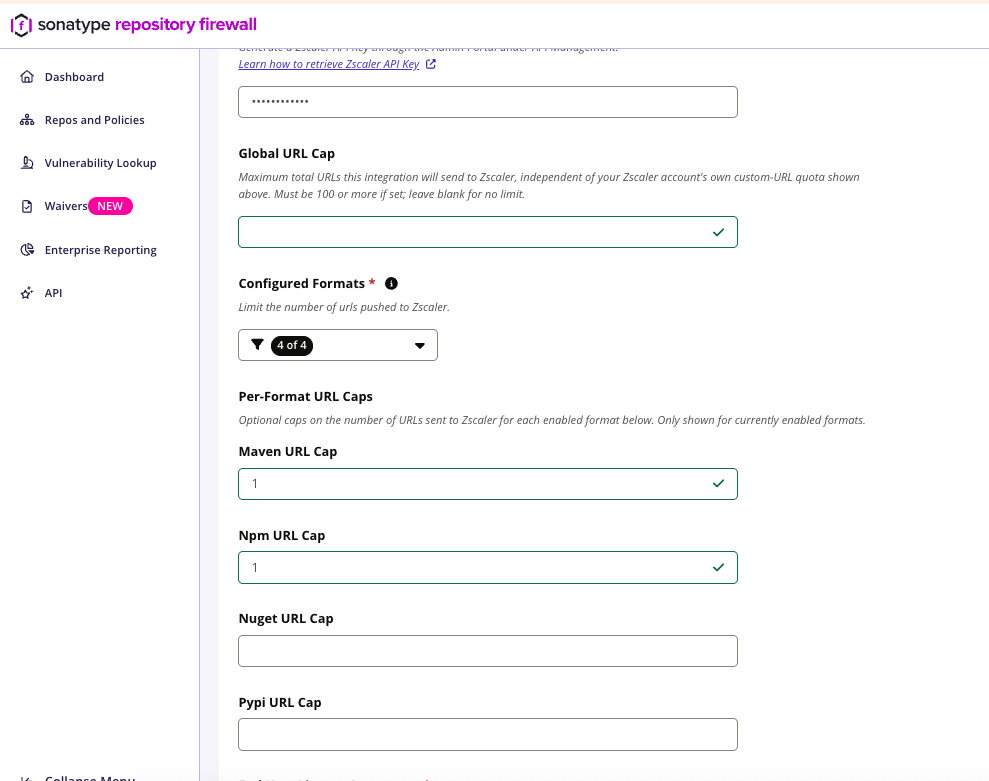
All URL cap fields are blank by default.
Setting | Valid Value | Behavior When Blank |
|---|---|---|
Global URL Cap | A whole number of 100 or more | No global Firewall-configured cap applies. Format-specific caps can still apply. |
Format-Specific URL Cap | A whole number of 1 or more | Global URL Cap applies when configured. If neither cap is configured, no Firewall-configured cap applies to that format. |
Format-specific URL cap fields are available for enabled Maven, npm, PyPI, and NuGet formats.
A format-specific URL cap takes precedence over Global URL Cap for that format. Firewall resolves the applicable cap independently for each enabled format.
When the number of URLs for a format exceeds the applicable cap, Firewall retains URLs from the beginning of the feed and removes URLs from the end. Firewall preserves the order supplied by Release Integrity and does not re-sort the feed.
Firewall preserves known Sonatype demo and proof-of-concept URLs when it can do so without exceeding the applicable cap. To make room for these URLs, Firewall removes lower-priority non-demo URLs. If the number of demo and proof-of-concept URLs exceeds the applicable cap, Firewall retains the earliest of those URLs in feed order up to the configured cap.
Note
Firewall applies the configured URL capacity limit before applying your ZIA account’s custom URL quota. The ZIA account quota can further reduce the number of URLs sent to Zscaler.
Trigger an Update to Zscaler
There is up to a 24-hour delay when configuring ZScaler before data is sent to the service. You may trigger the service to update immediately using the API.
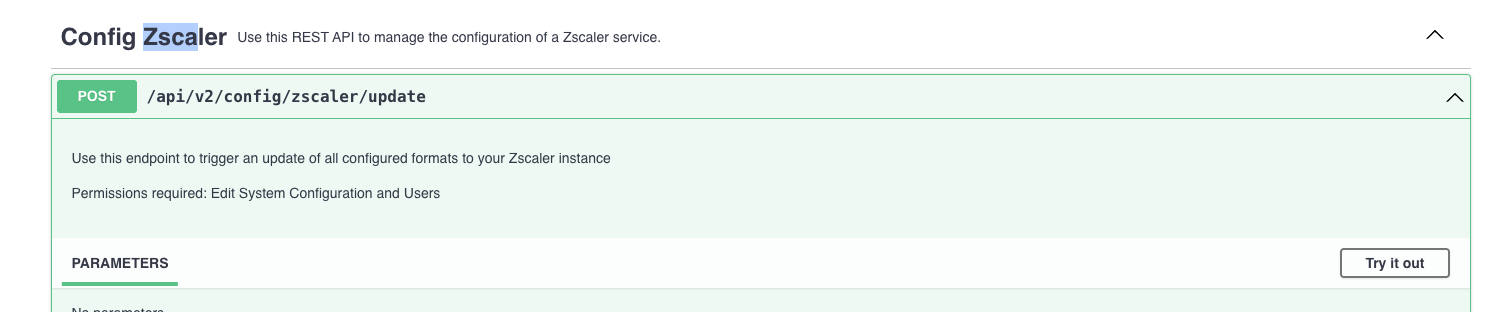
POST /api/v2/config/zscaler/update
Zscaler Custom URLs
The Zscaler integration uses custom URLs to restrict access to the active verified malware components covered by your configured formats. These are added as User Defined categories under the Zia Administrator → Resources → URL Categories with the following naming:
For IQ versions before 198
sonatype-{format}-shadow-download-defenseFor IQ version 198 and later
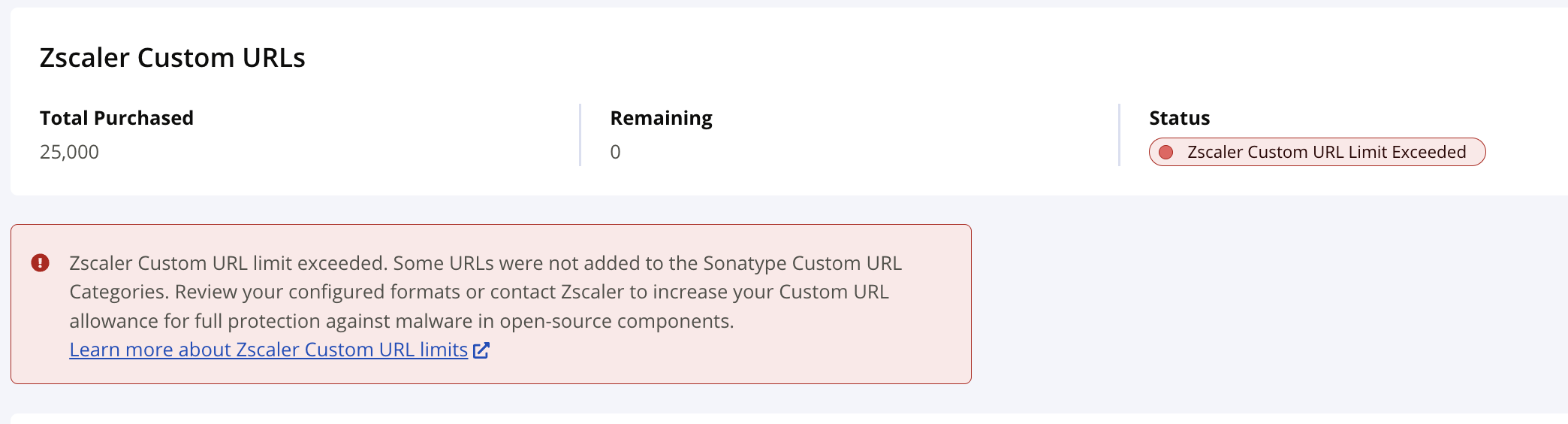
sonatype-{format}-{index}-shadow-download-defenseZscaler has a limit of 25,000 custom URLs or IP addresses (across all policies that use custom URLs or IP addresses) for performance, scalability, and manageability of its security service. This limit ensures that the platform can efficiently process vast amounts of internet traffic for all users without degradation. When Zscaler does not have enough available custom URLs to catalog the known malware for a specific ecosystem, you are not fully protected.
Total Purchased
The number of custom URLs allowed with your subscription.
Remaining
The number of custom URLs remaining.
Status
The status of the Repository Firewall integration.
Not Configured → The integration has not yet been configured and verified.
OSS Malware Catalog Synced → Zscaler is configured and malicious urls are under your subscription limit.
Zscaler Custom URL Limit Exceeded → You've reached the custom URL limit, and there are still more malicious urls to push.
Usage Notes
The Zscaler integration is supported for the following formats for automatic Malware detection:
maven, npm, PyPi, nuget
Repository Firewall create custom User Define URL categories by component format. These endpoints are updated once daily.
Sonatype recommends IQ Server 198 or later for reliable operation of Zscaler integration. Earlier versions may fail to populate certain URL categories (such as npm) when the Zscaler tenant supports URL limits higher than the default.