Reachability Analysis with Jenkins
Reachability Analysis detects method signatures in the application code that contain components with potentially exploitable security vulnerabilities and are in the execution path. The policy violations occurring due to such components, will be assigned the status of Reachable on the application report. Clicking on the policy violation gives the details of the implicated component.
This helps developers prioritize the remediation of such policy violations by replacing the vulnerable components that are reachable by executing the application.
This configuration is suitable for Pipeline, Multi-branch Pipeline, or any other build types that make use of the Jenkins pipeline (including using Jenkinsfile).
Enabling Reachability Analysis
To enable Reachability Analysis for Java, install or update the Sonatype Jenkins plugin to version 3.23 or later on the Jenkins instance that runs your project pipelines. Using Reachability Analysis for JavaScript requires Sonatype Jenkins plugin version 3.26.2 or later. Using Reachability Analysis for .NET requires Sonatype Platform Plugin for Jenkins version 3.32 or later. In addition, .NET SDK 8.0 or later must be installed on the Jenkins agent where the build runs.
Example Pipeline Script Enable Reachability Analysis
nexusPolicyEvaluation(
  iqScanPatterns: [
    [ scanPattern: '**/target/sonatype-clm/module.xml' ]
  ],
  reachability: [
    javaAnalysis: [
      enable: true
    ],
    // JS analysis supported from plugin v3.26.2+
    jsAnalysis: [
      enable: true
    ],
    // .NET analysis supported from plugin v3.32+
    dotNetAnalysis: [
      enable: true
    ]
  ]
)
Note
To enable Java, Javascript, and .NET Reachability Analysis in the same evaluation step, populate the javaAnalysis, jsAnalysis, and dotNetAnalysis sections.
Starting with plugin version 3.26.0, when reachability is enabled, a dedicated UI displays all components with their vulnerable signatures and clearly marks the reachable ones.
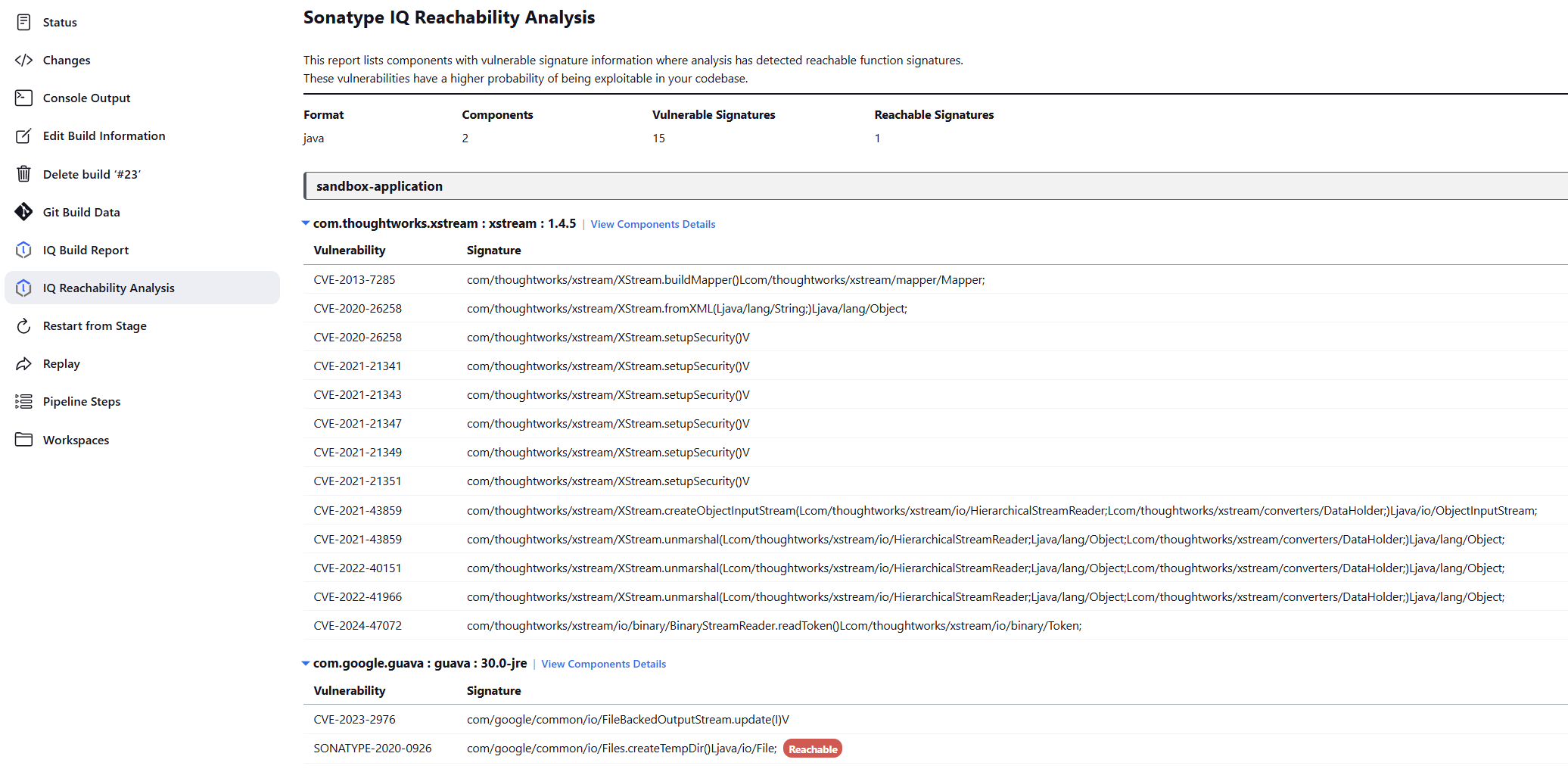
Using Java Reachability Analysis on Jenkins
For Best Results with Reachability Analysis
Results for Reachability Analysis depend on the strategy used to select the types of methods to scan and the selection of namespaces to narrow down the scan entry points.
Reachability Evidence
When Sonatype Jenkins runs a Java scan with reachability enabled, call path evidence is sent to IQ Server and displayed in the violation details view.
Reachability Evidence requires IQ Server 205 or later and Sonatype Platform Plugin for Jenkins 3.34.0 or later. See Version Requirements for details.
Strategies for Enabling Reachability Analysis
Minimal Configuration
The example below shows using the Reachability Analysis with minimal configuration.
reachability: [
  javaAnalysis: [
    enable: true
  ]
]
Selection of Namespaces
Select the methods that should be considered as entry points (points in code where execution begins) for the analysis.
Namespaces are specified at the level of packages. All packages nested under a namespace are considered for entry point selection. If multiple namespaces are specified, all of them will be included.
Reachability Analysis will start with the namespaces specified and subsequently analyze all others in the execution path.
Example:
Consider the following project structure:
	src
	|—main
	|	|—java
	|	|	|—com
	|	|	|	|—example
	|	|	|	|	|—iq
	|	|	|	|	|	|—domain
	|	|	|	|	|	|	|—DomainClassOne.java
	|	|	|	|	|	|—application
	|	|	|	|	|	|—repository
	|	|	|	|	|—wrappers
	|	|	|	|	|	|—OktaLoginWrapper.java
	|	|	|	|	|—configs
	|—test
	|	|—java
	|	|	|—com
	|	|	|	|—example
	|	|	|	|	|—iq
	|	|	|	|	|	|—domain
	|	|	|	|	|	|	|—DomainClassOne.java
	|	|	|	|	|	|—application
	|	|	|	|	|	|—repository
	|	|	|	|	|—wrappers
	|	|	|	|	|	|—OktaLoginWrapper.java
	|	|	|	|	|—configs
The Reachability Analysis feature is configured as follows:
reachability: [
  javaAnalysis: [
    enable: true,
    entrypointStrategy: 'ACCESSIBLE_CONCRETE',
    namespaces: [
      [namespace: 'com.example.iq']
    ]
  ]
]
In the example above, the namespaces property specifies the namespace
'com.example.iq', which will be considered as the entry point for the analysis. This namespace hasdomain,application, andrepositorypackages under its scope. Methods belonging toDomainClassOne.javaclass (under the domain package in the'com.example.iq'namespace) will be analyzed before other methods in the package classes. Similarly, methods belonging to classes under other applications and repository packages will be analyzed at the start of the analysis for the package.Packages of type wrappers, with namespace
'com.example.wrappers'and config packages with namespace'com.example.configs'will be omitted when an entry point for the analysis is being established. Similarly, methods belonging to theOktaLoginWrapperclass with namespace'com.example.wrappers.OktaLoginWrapper.java'will be omitted when establishing an entry point.Notes:
An entry point is any method signature that aligns with the selected strategy. For example, for
JAVA_MAINstrategy, all entry point methods havepublic static void mainas method signature.You can use regular expressions when specifying the namespace.
Example: For
org.foo.example, you can use regular expressions with'/'at the start and end of the string as/^org\\.+.*\\.example\$/.Specify at least one namespace (prefer your app’s root package, e.g.,
org.foo.example). For initial setup, a temporary catch-all like/.*/(some teams use.+) can unblock the pipeline, though it may be slower.If namespaces are omitted, reachability attempts to derive them from Lifecycle Proprietary Component Configuration (Package/Regex). If nothing is defined there, a warning is logged, no entry-points are discovered, and the run fails with "At least one entry-point required".
Using the Parameter Includes
Multi-module projects could have several .jar files when built. Many of these .jar files are dependencies of another .jar file, which could be the one containing the main application. By specifying the path to this specific .jar when running reachability analysis, you can avoid multiple evaluations of the same .jar files, which would occur when:
.jar files are evaluated separately.
.jar files are evaluated when invoked by the main application.
The includes parameter specifies a target path for the artifacts to be analyzed. It limits the scope of the analysis, resulting in better precision and reducing the utilization of system resources.
Example:
reachability: [
  javaAnalysis: [
    enable: true,
    entrypointStrategy: 'ACCESSIBLE_CONCRETE',
    includes: [
      // NOTE: 'target' here is just an example (Maven default). Adjust the pattern so it matches
      // your application binary and its dependencies (i.e. jar, war, ear files).
      [pattern: 'target/**/*.jar']
    ]
  ]
]
If
includesis omitted, the target location for the analysis will be the same as specified in theiqScanPatternsof thenexusPolicyEvaluationin the Jenkins file. This may increase the scope of the target analysis, leading to reduced precision.Entrypoint Strategy
When Reachability Analysis is enabled in Jenkins, you can choose one of the following strategies:
JAVA_MAIN:Selects all methods matchingpublic static void main(String[] args)PUBLIC_CONCRETE: Selects public non-abstract/synthetic methods from non-interface/annotation classesACCESSIBLE_CONCRETE: Selects public/protected non-abstract/synthetic methods from non-interface/annotation classes.CONCRETE: Selects all non-abstract/synthetic methods from non-interface/annotation classes. This is the default entrypoint strategy.ALL: Selects all methods from all non-interface/annotation classes.You can enable the Reachability Analysis feature with the minimal configuration as below:
Example:
The example below shows how to enable the Reachability Analysis feature with the
ACCESSIBLE_CONCRETEstrategy.reachability: [ javaAnalysis: [ enable: true, entrypointStrategy: 'ACCESSIBLE_CONCRETE' ] ]Analysis Algorithm
These are the supported algorithms for Java reachability analysis:
CHA(Class Hierarchy Analysis): A static call analysis that considers all methods in all possible loaded subclasses.RTA(Rapid Type Analysis): Similar to CHA, but improves precision by analyzing only classes instantiated during program execution.RTA_PLUS: Sonatype’s version of RTA, offering even greater precision and serving as the default algorithm.
Note
Sonatype recommends keeping the default (
RTA_PLUS). Do not change this setting unless directed by Sonatype Support.
Error Handling
By default, Jenkins will mark the pipeline as FAILURE if there are any error conditions in executing Reachability Analysis.
To avoid a pipeline FAILURE, set the failOnError parameter to false (true by default). If it is set to false, Jenkins will not change the build outcome on reachability analysis failures.
reachability: [
  failOnError: false,
  logLevel: 'DEBUG',
  javaAnalysis: [
    enable: true,
    entrypointStrategy: 'ACCESSIBLE_CONCRETE'
  ]
]
Expected Outputs
Reachability Analysis yields different outputs for a wide range of scenarios. The outputs depend on the type of artifacts analyzed, strategies used, and fine-tuning using the performance-enhancing parameters described above.
Reachability Analysis output is logged within the IQ Policy Evaluation log and can be found at the stage where policy evaluation is called within your pipeline.
Here are descriptions to a few sample outputs:
Sample output 1: Policy violations labeled as Reachable
On successful execution of Reachability Analysis, the number of "Reachable" components found will be logged as:
2024-07-25 15:08:32 GMT-05:00 [INFO] CallflowReachableMethodsCommand - Found 2 reachable methods
To view the actual method signatures of reachable methods, the logLevel should be set to DEBUG. However, this may lead to a lot of logging text and make the logs unreadable.
The Application Report will show the policy violations for components (belonging to the Maven ecosystem) that contain vulnerable method signatures.
Sample output 2: Policy violations labeled as "Not Reachable"
This occurs when Reachability Analysis does not find any "Reachable" methods. This means that there are no vulnerable components in the execution path of the analyzed application.
This scenario will appear in the log as:
2024-07-25 15:39:21 GMT-05:00 [INFO] CallflowReachableMethodsCommand - Found 0 reachable methods
Sample output 3: Reachability Analysis analysis skipped
This occurs when there are no vulnerable components found during the policy evaluation. Reachability Analysis is skipped.
This is logged in the pipeline log as:
2024-07-25 15:38:03 GMT-05:00 [INFO] Skipping callflow analysis; missing vulnerable component method data
Warning
The absence of "Reachable" methods does not guarantee safety. The analysis may not have been able to detect these methods due to misconfiguration of the feature. We recommend checking these configurations thoroughly, at the start of the analysis.
Other Considerations While Running Reachability Analysis
Running in multi-module projects
For a project that has multiple modules and produces multiple artifacts, Reachability Analysis should be configured with one of the strategies described above, for accurate results.
If a project produces two different artifacts, for example, one .jar file for a client service and one .jar file for a server, each of these .jar files should be evaluated separately. We recommend setting up a separate pipeline in Jenkins, one that produces the client .jar and one that produces the server .jar. This way you can use the includes parameter to specify the artifact you want to analyze on each pipeline.
If a multi-module project has modules that are meant to be used as a library for other projects, using
JAVA_MAINwill not produce any "Reachable" methods. This is because none of the modules will have the methods with the signature public static void main. In such cases, it is best to useACCESSIBLE_CONCRETEorPUBLIC_CONCRETEin the strategies section above.
Execution Times
Reachability Analysis can be a time and memory intensive process, depending upon the size of the project that is being analyzed. The execution involves going through all entry points specified, creating a call graph, and process the code to detect vulnerable methods in the execution path. This could be a huge overhead if your project has millions of lines of code, lots of dependencies and entry points.
To reduce the execution times, here are some recommendations:
If your project has a releaseable main branch, run Reachability Analysis on the main branch instead of all the feature branches on each new commit.
If you have changes in the project manifest, run Reachability Analysis in the feature branches. This is a trade off between build time and the extra analysis step due to Reachability Analysis.
Run Reachability Analysis at fixed times, for example, on nightly builds.
If you have multi-module projects, separate the projects before running Reachability Analysis.
Using JavaScript Reachability Analysis on Jenkins
JavaScript Reachability Analysis is currently supported only by the Sonatype Platform Plugin for Jenkins integration, which also offers fine‑grained configuration for the feature.
Minimal Configuration
To add JavaScript Reachability Analysis to an existing pipeline, add a jsAnalysis clause to the reachability section, enable it, and specify the project source file (Ant‑style glob patterns are supported). These source file serve as the starting point for the analysis. All paths or patterns are relative to the workspace directory. Do not include any files from node_modules; those are project dependencies, not source files. We also recommend omitting file extensions in your patterns, since the analyzer recognizes common JavaScript and TypeScript extensions.
The example below shows using the Javascript Reachability Analysis with a minimal configuration:
reachability: [
  jsAnalysis: [
    enable: true,
    sourceFiles: [
      [pattern: 'src/**/*']
    ]
  ]
]
Optional Parameters
Node.js Executable
Reachability Analysis requires a Node.js executable (v16+) on the pipeline’s
PATH. This could be achieved via the Jenkins NodeJS plugin, which allow multiple versions to be configured as global tools in Jenkins. If no Node executable is on the pipeline'sPATH, an absolute path can be explicitly specified as below:reachability: [ jsAnalysis: [ enable: true, node: [ executable: '/path/to/node/exec' // absolute path expected; may include env. vars. e.g. "${env.WORKSPACE}/path/to/node" ], sourceFiles: [ [pattern: 'src/**/*'] ] ] ]File Exclusion
If your project contains other JavaScript files (e.g. tests) that shouldn’t be included in Reachability Analysis, they can be excluded in the same way as
sourceFiles, via anexcludeFilessection:reachability: [ jsAnalysis: [ enable: true, sourceFiles: [ [pattern: 'src/**/*'] ], excludeFiles: [ [pattern: 'test/**/*'] ] ] ]Project Directory
By default, reachability analysis considers the workspace root where
package.jsonlives as the project directory. If your source lives elsewhere, setprojectDirectoryrelative to the workspace:reachability: [ jsAnalysis: [ enable: true, projectDirectory: 'app/root', // relative to the workspace directory sourceFiles: [ [pattern: 'src/**/*'] ] ] ]
Using .NET Reachability Analysis on Jenkins
.NET Reachability Analysis is available in the Sonatype Platform Plugin for Jenkins version 3.32 and later, for both Freestyle jobs and Pipeline scripts.
Freestyle Job Configuration
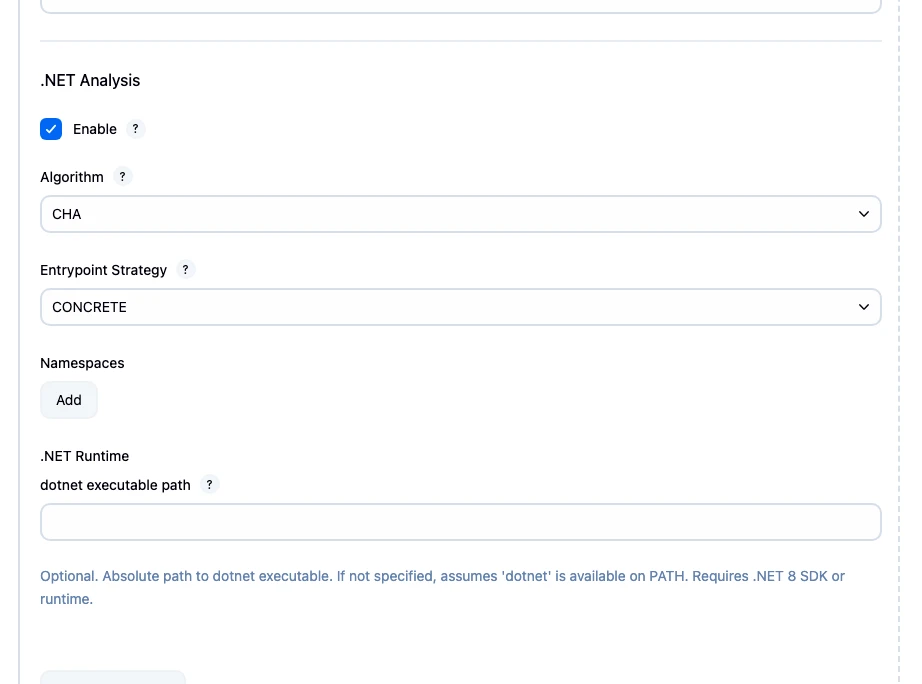
In your Jenkins job configuration, add the Invoke Sonatype Policy Evaluation build step.
Configure the IQ Instance, Stage, and Application as you normally would.
Expand the Reachability Analysis section at the bottom of the build step.
Under .NET Analysis, check the Enable checkbox.
Configure the .NET-specific options:
Field | Description |
|---|---|
Enable | Check to enable .NET reachability analysis. |
Algorithm | Callflow algorithm: |
Entrypoint Strategy | Controls how entry points are identified. Options: |
Namespaces | One or more namespace prefixes or regex patterns to filter entry points. Click Add to add entries. Prefix matching is the default; enclose a pattern in |
.NET Runtime → dotnet executable path | Absolute path to the |
The Other Options section within Reachability Analysis provides settings shared across all language analyses:
Field | Description |
|---|---|
Log Level | Controls verbosity: |
Fail on analysis errors | If checked, a reachability analysis failure causes the build to fail. If unchecked, the build is marked unstable instead. |
Entrypoint Strategy
The entrypoint strategy determines which methods in the application are treated as starting points for call graph analysis.
Strategy | Description |
|---|---|
| (Default) All non-abstract, non-synthetic methods in non-interface classes. |
| Public, non-abstract, non-synthetic methods. Recommended for web applications and library projects. |
| Public or protected, non-abstract, non-synthetic methods in non-interface classes. |
| Static methods matching the standard .NET |
| All methods in non-interface classes, including abstract methods. |
Use the Namespaces field to further restrict entry points to specific namespaces and improve precision.
Pipeline Configuration
In Jenkins Pipeline scripts, configure .NET reachability via the dotNetAnalysis parameter of the nexusPolicyEvaluation step.
Examples
Basic Example
Enable .NET reachability with default settings:
nexusPolicyEvaluation(
    iqApplication: manualApplication('my-dotnet-app'),
    iqInstanceId: 'iq-server',
    iqStage: 'build',
    reachability: [
        dotNetAnalysis: [
            enable: true
        ]
    ]
)
With Entrypoint Strategy and Namespaces
Use PUBLIC_CONCRETE strategy with namespace filtering for a web application:
nexusPolicyEvaluation(
    iqApplication: manualApplication('my-dotnet-app'),
    iqInstanceId: 'iq-server',
    iqStage: 'build',
    reachability: [
        dotNetAnalysis: [
            enable: true,
            entrypointStrategy: 'PUBLIC_CONCRETE',
            namespaces: [[namespace: 'MyApp.Controllers'], [namespace: 'MyApp.Services']]
        ]
    ]
)
With Custom dotnet Path and Algorithm
Specify a custom dotnet executable path and algorithm:
nexusPolicyEvaluation(
    iqApplication: manualApplication('my-dotnet-app'),
    iqInstanceId: 'iq-server',
    iqStage: 'build',
    reachability: [
        dotNetAnalysis: [
            enable: true,
            algorithm: 'RTA_PLUS',
            entrypointStrategy: 'CONCRETE',
            dotNetConfig: [dotnetPath: '/usr/local/share/dotnet/dotnet']
        ]
    ]
)
Full Example in Declarative Pipeline
pipeline {
    agent any
    stages {
        stage('Build') {
            steps {
                sh 'dotnet publish -c Release -o ./publish'
            }
        }
        stage('Security Scan') {
            steps {
                nexusPolicyEvaluation(
                    iqApplication: manualApplication('my-dotnet-app'),
                    iqInstanceId: 'iq-server',
                    iqStage: 'build',
                    iqScanPatterns: [[scanPattern: 'publish/**/*.dll']],
                    reachability: [
                        dotNetAnalysis: [
                            enable: true,
                            entrypointStrategy: 'PUBLIC_CONCRETE',
                            namespaces: [[namespace: 'MyApp']]
                        ],
                        logLevel: 'INFO',
                        failOnError: false
                    ]
                )
            }
        }
    }
}
Note
iqScanPatterns controls which files are sent for component analysis only. The reachability analyzer independently scans the entire workspace for .dll files (**/*.dll). To limit which assemblies are analyzed for reachability, use namespace filtering rather than scan patterns.
Pipeline Parameter Reference
Parameter | Type | Default | Description |
|---|---|---|---|
| Boolean |
| Enable .NET reachability analysis. |
| String |
| Callflow algorithm: |
| String |
| Entry point strategy: |
| List |
| Namespace filters, each entry as |
| String |
| Path to the |
| String |
| Log level: |
| Boolean |
| Fail build on reachability errors. |
| String | None | Maximum time to wait for analysis before aborting (e.g. 5m, PT5M) |
Tip
Use the Pipeline Syntax generator in Jenkins (available at /pipeline-syntax/) to generate the nexusPolicyEvaluation step with .NET reachability options via a UI form.
Differences from CLI Configuration
Feature | CLI | Jenkins Plugin |
|---|---|---|
Enable .NET reachability |
| Enable checkbox |
Entrypoint strategy |
| Entrypoint Strategy dropdown |
Namespace filtering |
| Namespaces repeatable field |
dotnet path |
| .NET Runtime → dotnet executable path |
Algorithm | Server-side only | Algorithm dropdown (per-job override) |
Results file |
| Not available (results are sent directly to IQ Server) |
Log level |
| Log Level dropdown in Other Options |
Fail on errors | Server-side config | Fail on analysis errors checkbox |
Note
In the Jenkins plugin, the algorithm can be configured per-job via the Algorithm dropdown, whereas in the CLI the algorithm is always determined by the IQ Server configuration.