Sonatype IQ Server 208 – 208.1 Release Notes
The IQ 208 release includes multiple changes to our IQ-powered solutions. View the details in each solution’s section below.
What's New and Noteworthy in IQ Server 208.1?
Released October 22, 2026
Fix for eMudhra Certificate Authority Compromise
Sonatype IQ Server now includes additional certificate trust protections in response to the recent eMudhra certificate authority compromise. We updated the UI and backend container images to remove trust in affected root certificates and prevent connections that rely on compromised certificate chains.
What's New and Noteworthy in IQ Server 208?
Released October 13, 2026
 Improvements Impacting Multiple Solutions
This release includes the following improvements that impact multiple IQ Server-powered solutions:
Upgrade Impact for Advanced Search: Upgraded Lucene Library from 8.x to 10.5.1
IQ Server 208 upgrades the bundled Lucene library to version 10.5.1. Existing Advanced Search indexes created with Lucene 8.x format must be cleared and rebuilt after the upgrade.
Schedule a maintenance window and complete these steps:
Stop IQ Server.
In the IQ Server work directory, rename the search/index folder to a timestamped backup. Rename only the index folder; preserve the rest of the search directory.
Restart IQ Server.
Go to System Preferences > Advanced Search; ensure that Enabled is selected. Then, select the Re-Index button. Alternatively, you can trigger a reindex via the API using a command like the following:
curl -u <admin_username>:<admin_password> -X POST http://<base_url>/api/v2/search/advanced/index
Verify that re-indexing completes and that Advanced Search works before removing the backup.
Advanced Search results may be unavailable or incomplete while the index rebuilds.
Earlier Vulnerability Detection for npm Packages
Sonatype IQ now detects npm package vulnerabilities earlier by incorporating findings from fast-track security research without waiting for full vulnerability research to complete. Fast-track research provides preliminary vulnerability intelligence while Sonatype conducts more comprehensive analysis.
This enhancement expands Sonatype’s vulnerability coverage and helps customers identify potential security risks sooner. Note that, because fast-track findings are preliminary, vulnerability results may change or disappear as Sonatype completes its research and validates the findings.
Delete Pending and Rejected Policy Waiver Requests
Sonatype Lifecycle and Sonatype Repository Firewall now let authorized users delete policy waiver requests that are still pending or have been rejected. Reviewers with the Waive Policy Violations permission can remove outdated or unnecessary requests directly from the waiver request workflow, helping keep waiver dashboards focused on requests that still require attention.
This enhancement completes the policy waiver request lifecycle by giving teams a straightforward way to clean up stale requests without approving them first or relying on other workarounds. It also reduces administrative overhead for organizations managing large volumes of waiver requests across applications, organizations, repositories, and repository managers.
More Reliable Audit Logging for Multi-Node Deployments
Sonatype IQ Server now supports database-backed audit logging, providing a more reliable audit trail for multi-node deployments. Storing audit events in the Lifecycle database eliminates the concurrent write conflicts that could cause records to become corrupted or silently lost when multiple server nodes wrote to shared NFS or EFS audit log files. This improvement helps ensure that audit data used for operational monitoring and compliance remains complete and dependable.
New installations use database-backed audit logging by default. Existing installations that upgrade continue using file-based audit logging until database-backed logging is enabled via the Feature Configuration REST API. This change does not alter existing audit workflows or the audit event format: the Audit Logs REST API and User Activity UI continue to provide audit information through their existing interfaces.
Configurable Audit Event Retention
Sonatype IQ Server now lets administrators configure database-backed audit event retention periods in config.yml. You can set separate retention windows for self-hosted and multi-tenant deployments, making it easier to align audit history with your organization’s compliance, operational, and database-storage requirements without requiring code changes.
Existing deployments retain the current defaults of 30 days for self-hosted environments and 50 days for multi-tenant environments unless you configure different values. IQ uses the configured retention window when purging expired audit events, giving administrators greater control over how long audit history remains available while preserving existing behavior by default.
 Sonatype Lifecycle
This release includes the following changes for Sonatype Lifecycle:
Hosted Repository Scanning and Continuous Monitoring
Sonatype Lifecycle now supports scanning hosted repositories connected from Sonatype Nexus Repository, giving teams visibility into open source risk for components stored in their internally managed repositories. Administrators can select which hosted repositories to monitor and define the evaluation scope based on criteria such as component activity, deployed versions, and policy evaluation stage. Lifecycle evaluates the selected repository contents and provides component findings, policy reports, and remediation priorities through the Hosted Repos experience.
Hosted Repository Scanning helps organizations identify risk in components that may already be stored and reused across development teams, rather than waiting for those components to appear in an application scan. After the initial scan, continuous monitoring reevaluates in-scope components as Sonatype intelligence changes, helping teams detect newly disclosed risk without repeatedly rescanning repositories. Shared and repository-specific monitoring settings also let teams focus analysis on the content that matters most, reducing unnecessary evaluation work while supporting more consistent governance of internally managed components.
For full details and requirements, see the Hosted Repository Scanning help documentation.
New Legal Risk Analyzer Enterprise Reporting Dashboard
Sonatype Lifecycle now includes the new Legal Risk Analyzer dashboard, giving teams a centralized view of legal risk across applications and components. The dashboard brings together declared license information from Lifecycle with observed license insights from Advanced Legal Pack, helping teams understand where deeper component analysis expands license coverage and reveals additional legal obligations or higher-risk findings.
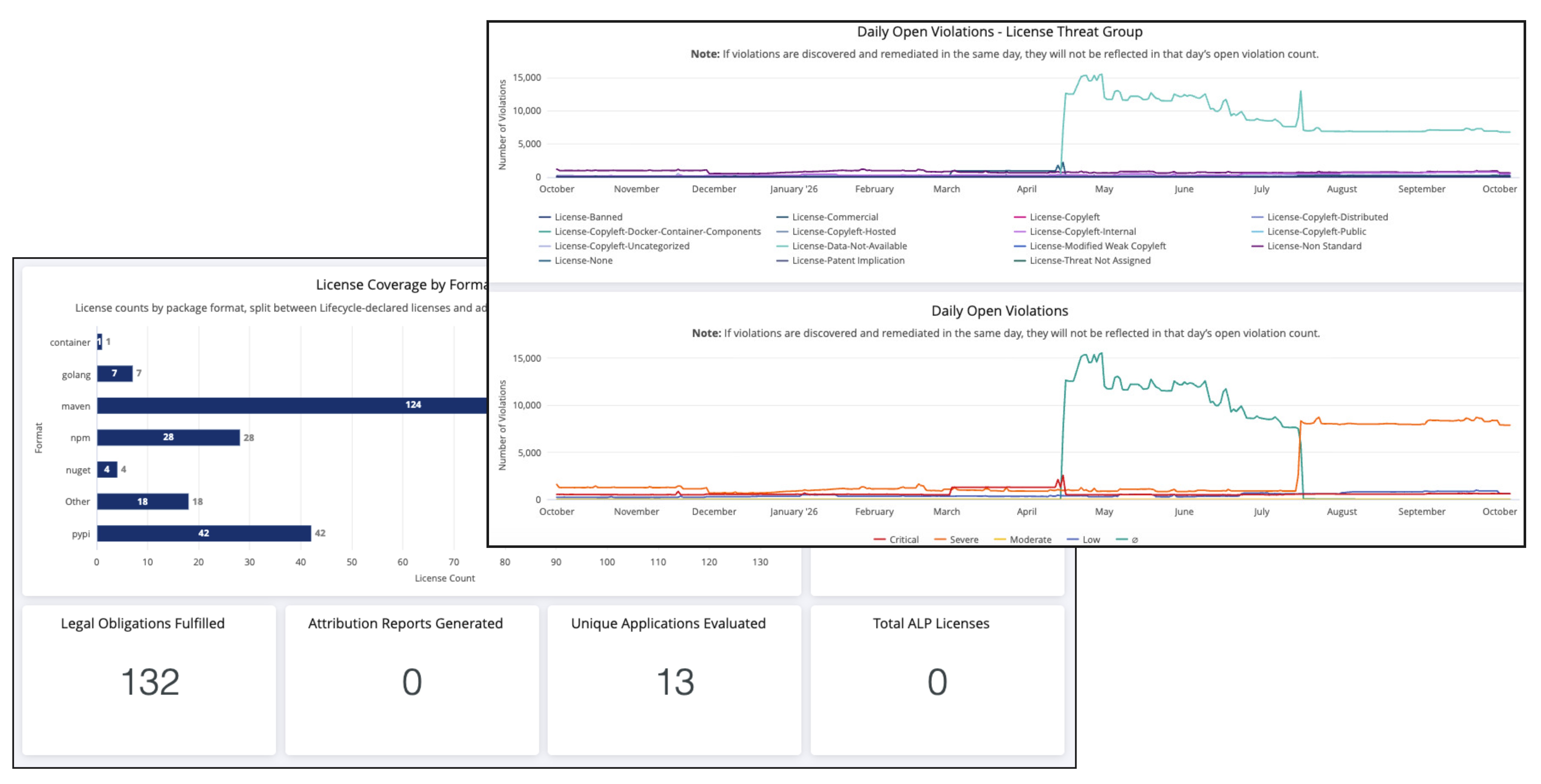 |
Teams can use the dashboard to compare license coverage by package format, review fulfilled legal obligations and collected legal evidence, track attribution-report activity, analyze waiver and violation trends, and drill into the applications and components contributing to legal risk. Customers without Advanced Legal Pack can use the dashboard to review Lifecycle legal-risk data, while Advanced Legal Pack customers gain additional visibility into observed licenses, obligations, attribution activity, and supporting legal evidence.
For full details, see the Legal Risk Analyzer help documentation.
Expanded Yarn Berry Workspace Dependency Coverage
Sonatype Lifecycle now provides complete transitive dependency coverage for Yarn Berry v2, v3, and v4 workspace monorepos during manifest-based analysis. Lifecycle builds the dependency graph from yarn.lock, providing comprehensive visibility into supported third-party dependencies for projects that use Plug'n'Play or the node_modules installation mode. Lifecycle also correctly identifies dependencies declared with npm: aliases by their installed package identity and distinguishes local workspace packages from external components.
With this expanded coverage, teams can identify security and policy risks in transitive dependencies that previous scans might not have detected, helping ensure more accurate component inventories, policy evaluations, and SBOMs. Yarn Berry workspace scans might report additional components and associated policy violations after upgrading; this increase reflects improved dependency visibility rather than duplicate component reporting.
See the npm Application Analysis help documentation for full details.
Consistent Source Control Evaluations for API-Onboarded Repositories
Sonatype Lifecycle now provides the same automated evaluation experience for repositories onboarded through the REST API as repositories onboarded through the UI. When you create an application source control entry with a repository URL by using POST /api/v2/sourceControl/application/{ownerId}, Lifecycle automatically initiates an initial Source-stage evaluation when source control evaluations are enabled for the application. You no longer need to call the Source Control Evaluation REST API separately to evaluate the repository after onboarding. Lifecycle also supports continuous pull request evaluations at the Develop stage for eligible repositories, helping teams receive policy feedback earlier in the development workflow regardless of how they onboard repositories.
The initial onboarding evaluation applies only to application source control entries that include a repository URL. Creating an organization source control entry or an application entry without a repository URL does not initiate an evaluation. Lifecycle treats the onboarding evaluation as an internally initiated evaluation, so the Default Branch Monitoring suppression period for externally initiated Source-stage evaluations does not apply. Repositories onboarded before this capability became available do not receive an evaluation retroactively; their next Source-stage evaluation can occur during a subsequent Default Branch Monitoring cycle based on the configured monitoring interval.
For full details, see the Source Control REST API help documentation.
Pull Request Monitoring for Main-to-Release Branch Workflows
Sonatype Lifecycle now supports pull request monitoring when the configured default branch is the source and a non-default branch, such as a release branch, is the target. This enhancement applies across supported source control integrations and helps teams using GitFlow, Release Flow, and similar branching strategies evaluate code as it moves from the main branch into release branches without relying on manual workarounds.
For Bitbucket Server and Data Center, Lifecycle also generates Code Insights reports for these newly supported pull requests. This allows repository-level merge checks that require a Sonatype Code Insights report to complete automatically for default-to-release branch workflows, helping teams maintain consistent policy enforcement throughout their release process.
For full details, see the Bitbucket Code Insights help documentation.
Mythos Readiness Enterprise Reporting Dashboard Renamed to Sonatype Advanced Vulnerability Intelligence
The Mythos Readiness dashboard is now named Sonatype Advanced Vulnerability Intelligence. This new name better reflect the dashboard's purpose: helping teams identify applications with components that may be affected by privately disclosed vulnerabilities so that they can assess potential impact and prioritize remediation.
Organization Filtering for Sonatype Advanced Vulnerability Intelligence (Previously Mythos Readiness) Dashboard
The Sonatype Advanced Vulnerability Intelligence (previously called Mythos Readiness ) dashboard now includes an Organization filter, making it easier to focus readiness data on the parts of your organization that matter most. You can select one or more organizations to narrow the dashboard and review application and component readiness within that scope.
The selected organization filter applies across the dashboard’s summary cards, visualizations, and Component Inventory table. This makes it easier for security and application teams to assess affected components, Golden Fix availability, end-of-life exposure, and other readiness indicators for specific organizational groups.
Expanded Swift Package.resolved Support
Sonatype Lifecycle now supports Swift Package.resolved versions 2 and 3, improving component identification for projects that use modern versions of Swift Package Manager. Lifecycle identifies dependencies that use remoteSourceControl with a remote Git repository, helping teams gain more accurate visibility into third-party Swift components during application analysis.
For Package.resolved versions 2 and 3, Lifecycle excludes local-path, registry-based, and unrecognized dependency types from component results. This keeps analysis focused on supported third-party Git dependencies while avoiding local project dependencies that do not represent externally sourced components.
Waiver Expiration Notifications for Lifecycle Applications and Organizations
Sonatype Lifecycle now supports waiver expiration notifications for applications and organizations, helping teams take action before temporary policy exceptions expire. Authorized users can configure notification settings at the application or organization level, including role-based recipients, so the appropriate stakeholders receive advance email notifications for expiring waivers.
Lifecycle also supports Waiver Expiration webhook events for application and organization waivers. Teams can subscribe Lifecycle-context webhooks to these events and route expiration details into their existing automation and notification workflows. Repository Firewall waiver-expiration behavior is unchanged.
 Sonatype AI Developer
This release does not include any Sonatype AI Developer-specific changes.
 Sonatype Developer
This release does not include any Sonatype Developer-specific changes.
 Sonatype SBOM Manager
This release does not include any Sonatype SBOM Manager-specific changes.
 Sonatype Repository Firewall
This release includes the following changes for Sonatype Repository Firewall:
Repository Firewall Support for Swift Proxy Repositories
Sonatype Repository Firewall now supports Swift proxy repositories in Sonatype Nexus Repository, extending policy evaluation and quarantine protection to Swift dependencies. When developers request Swift packages through a protected proxy repository, Repository Firewall evaluates the package against configured Proxy-stage policies and can block packages that introduce unacceptable open source risk before they enter development workflows.
Swift proxy repositories also integrate with Repository Health Check and Firewall reporting, giving teams visibility into policy violations and repository risk alongside other supported package ecosystems. This helps organizations apply more consistent software supply chain controls to Swift development while continuing to manage dependencies through Nexus Repository.
Bug Fixes
Issue ID | Description |
|---|---|
FIRE-762 | Cleanup policy removal of cached Docker images now triggers the corresponding container evaluation report deletion in Repository Firewall, keeping IQ Server storage consistent with the repository cache. |
FIRE-724 |
|
FIRE-517 | Policy Compliant Component Selection (PCCS) for PyPI proxy repositories now correctly filters package versions that violate time-based Firewall policies from the simple index on the first request, preventing pip from attempting to download quarantined versions. |
CLM-51743 | AI Developer loads correctly when IQ Server is configured with a non-root |
CLM-51328 | SBOM Manager preserves existing SBOMs during report processing and policy re-evaluation, even when the active license limit is reached or the license changes, with count enforcement applied only when new SBOMs are uploaded. |
CLM-51297 | The server version banner is now written to |
CLM-50593 | Advanced Search indexes from earlier installations continue receiving incremental updates after an upgrade, rather than silently stalling and returning stale results. |
CLM-49848 | The relay-link status badge in the Manage GitHub Apps list now appears only when the relay integration feature is enabled, eliminating the misleading "Pending registration" indicator that previously displayed on every GitHub App under default self-hosted configurations. |
CLM-47953 | Modern SPDX license identifiers such as |
CLM-46722 | OIDC/OAuth2 authentication diagnostics now include JWT claim values at TRACE log level, making it possible to troubleshoot group mapping and role assignment issues without requiring browser-captured IdP responses. |
CLM-45874 | The |
CLM-45805 | SBOM Manager's application overview now displays all SBOM rows fully visible and clickable regardless of browser window size or screen resolution. |
CLM-45385 | Support bundle downloads for large tenants complete successfully without timing out, as the archive now streams to the client as it is generated rather than waiting for the full file to be built before sending any data. |
CLM-45380 | Tenant provisioning in multi-node SaaS deployments completes successfully without search index lock conflicts, ensuring new instances reach an active state without requiring manual intervention. |
CLM-44461 | Reviewer comments added to a waiver request during the approval or rejection process are now preserved in the waiver record and visible in the approved waiver detail view. |
CLM-44448 | The Legal backlog's application table now displays a loading indicator while results are being fetched, and the "No applications found" message appears only after the request completes with no results. |
CLM-44361 | Legal tab Application backlog pages load significantly faster in self-hosted instances with large numbers of applications, as filtering, sorting, and pagination are now handled by the database rather than in memory. |
CLM-44352 | The Legal Application backlog dashboard loads significantly faster for organizations with large numbers of applications, including those with 50,000 or more. |
CLM-43913 | The |
CLM-42907 | Startup validation now refuses to launch when the database schema version is newer than the running application supports, logging a clear fatal message that identifies the version mismatch per data store and instructs operators to use the correct application version or restore a matching database backup; an escape hatch is available by setting the environment variable |
CLM-42782 | Reachability Analysis status displays consistently across all violation views, with vulnerabilities lacking callable method signatures now correctly labeled "Unknown" instead of "Not Reachable." |
CLM-42239 | Policy evaluation completes successfully when concurrent scans are processed against file-backed report storage. |
CLM-42088 | OIDC single sign-on re-authentication succeeds after session timeout when using Microsoft Entra ID or other identity providers that require an exact-match redirect URI. |
CLM-42014 | Client-side validation for application names now correctly rejects forward slashes inline, showing an error message and preventing form submission before reaching the server. |
CLM-41535 | Pending waiver requests can now be rejected even when the underlying policy violation no longer exists, allowing reviewers to clear orphaned requests through the standard UI or API without requiring database intervention. |
CLM-41113 | Reachability Analysis results are now preserved when a scan is promoted between lifecycle stages, ensuring the promoted report displays the same reachability status as the source report. |
CLM-40952 | The Developer Priorities CSV export ( |
CLM-40847 | Role permission assignments take effect reliably for all users, including LDAP-authenticated users, without requiring an application restart when permissions are updated concurrently. |
CLM-40845 | Audit log responses from |
CLM-40826 | The |
CLM-40070 | CycloneDX SBOM exports now correctly attribute vulnerability rating scores to Sonatype when Sonatype calculated the CVSS score, rather than incorrectly labeling Sonatype-computed scores as originating from NVD. |
CLM-39952 | Policy condition value selects display the correct saved value immediately after updating a constraint, without requiring a page navigation to refresh the view. |
CLM-39541 | Policy violation rows in the component details report now display consistently after a waiver is removed, reflecting the open status both in the Waiver Status column and in the violation's visual presentation without requiring a re-evaluation. |
CLM-39539 | Advanced Search results now include vulnerabilities when queried by CVE identifier, even when the CVE is recorded as an alias of a Sonatype-specific vulnerability identifier rather than the primary ID. |
CLM-39468 | GitLab commit-status updates are processed reliably without incorrectly suspending the repository URL when a referenced commit hash is not found. |
CLM-39406 | Saving custom filters in Success Metrics and Enterprise Reporting works correctly for LDAP users whose directory distinguished names exceed 50 characters. |
CLM-39367 | Version Explorer loads component and version details successfully even when the application's Source Control configuration contains an invalid access token, with pull request and remediation features gracefully marked as unavailable instead of returning an error. |
CLM-39208 | Role Memberships API endpoints now accept user and group names containing slash characters, enabling scripted role membership management for IdP-integrated environments where group names include path separators such as |
CLM-39181 | License threat levels in PDF exports, raw report API responses, and SBOM exports now consistently reflect the effective license rather than displaying a higher threat level derived from synthetic placeholder licenses. |
CLM-38965 | Deleting an organization with a large number of applications completes more efficiently, preserves progress if the server restarts mid-deletion, and allows a re-issued delete request to resume from where it left off rather than starting over. |
CLM-38947 | Reachability markers and their associated auto-waivers are correctly preserved in application reports after Continuous Monitoring re-evaluates a previously scanned release stage application. |
CLM-38931 | Developer Dashboard Overview card footer links now open the correct Sonatype documentation pages for CI/CD systems, SCM integrations, and IDE integrations in a new tab. |
CLM-38699 | Policies combining a DependencyType condition with other conditions now correctly evaluate and trigger violations for components where dependency type data is unavailable, such as Python packages scanned via |
CLM-38693 | Version Explorer vulnerability counts and severity ratings now stay consistent across all views when evaluating which version of a component to adopt. |
CLM-38597 | Azure DevOps pull request status checks for "Security/IQ Policy Evaluation" now resolve correctly after a pipeline-triggered policy evaluation completes on a feature branch, allowing developers to proceed with merging without requiring Pull Request Commenting to be enabled. |
CLM-38445 | Policy re-evaluation completes successfully on NFS-backed storage environments, even when filesystem metadata caching causes stale directory entries to appear during report replacement. |
CLM-38428 | Automated remediation pull requests now support a configurable commit message template, allowing administrators to define a custom format using |
CLM-38357 | The Advanced Legal Pack License Obligations tile now displays complete obligation text for components with disjunctive (OR) licenses, including an explanatory message when no standard text is available for a specific license variant. |
CLM-38349 | The Advanced Legal Pack license details panel now displays a clear explanation and recommended action when a component carries an unidentifiable license variant, rather than showing an unexplained empty text area. |
CLM-37843 | The |
CLM-37390 | The dashboard policy violations CSV export now includes a new "Organization Path" column showing the full ancestor hierarchy for each application; consumers that validate an exact column count will need to be updated to account for this additional column. |
CLM-37199 | The |
CLM-37179 | Golden Version suggestions now require the recommended version to carry zero policy violations, meaning fewer versions may qualify as Golden compared to previous behavior. |
CLM-37133 | Policy notification overrides inherited from a parent organization are now correctly displayed when viewing a policy from a child application or organization. |
CLM-37101 | The |
CLM-36831 | SPDX imports containing Package URLs with percent-encoded special characters now display correctly in SBOM Manager, with encoding preserved accurately throughout the import process rather than being corrupted into unreadable characters. |
CLM-36783 | Transitive dependency labels now appear correctly for all components in a report, including those in mixed scans where some components previously received no Direct or Transitive classification. |
CLM-36766 | Pull request status checks for SCM-integrated applications now complete reliably, even when a transient SCM error occurs or when developers follow common branching workflows such as merging an updated base branch into an open pull request. |
CLM-36306 | Log entries for corrupted report JSON files now include the affected application, scan ID, and specific report entry name, making it possible to identify and resolve the problematic file without manual inspection of the report directory. |
CLM-35754 | License data synchronization across high-availability cluster nodes completes reliably without duplicate-key errors or transaction rollbacks during concurrent refreshes. |
CLM-35315 | Reachability analysis results now display correctly when scanning an application multiple times, including when alternating between scans with and without the |
CLM-35150 | Support zip database exports now include vulnerability group data, ensuring policies that reference security vulnerability groups remain valid and resolvable when the zip is loaded for troubleshooting. |
CLM-34757 | The OpenAPI specification for CycloneDX SBOM export endpoints now correctly documents the response body schema and the |
CLM-34330 | Policy violations dashboard background migration completes reliably under concurrent write load, preventing the dashboard from becoming inoperable after upgrading with a PostgreSQL database. |
CLM-34302 | Proprietary regex matchers containing the |
CLM-34161 | CycloneDX SBOM ingestion now correctly processes UTF-16 BOM-encoded files, reporting accurate component counts and policy violations instead of silently completing with zero results. |
CLM-34160 | Scan tickets now include a warning when files in an uploaded archive could not be read, making it visible that a report may be incomplete rather than silently returning a successful evaluation. |
CLM-33893 | The global error banner now displays a meaningful, actionable message when the IQ server cannot be reached, instead of showing a generic placeholder. |
CLM-32605 | The Access tile on organization pages now displays a clear error message with a retry option when role membership data cannot be loaded, rather than incorrectly showing "No local access configured." |
CLM-32341 | License enforcement checks for features unavailable on Firewall-only licenses are now logged at the appropriate severity level, eliminating spurious error messages in server logs when navigating organizations. |
CLM-32103 | SCM onboarding validation failures now log the specific repository whose URL is invalid, making it straightforward to identify and resolve problematic repositories without manually inspecting the SCM system's full repository list. |
CLM-32078 | Proxy configuration settings are accessible without a product license installed. |
CLM-32012 | PDF report titles for applications with long names now display in full, with the font size automatically adjusted to fit the complete application name within the page width. |
CLM-31661 | The "Security/IQ Policy Evaluation" status check on Azure DevOps pull requests now resolves automatically after a successful policy evaluation, without requiring a separate manual evaluation on the feature branch. |
CLM-30716 | The application scan history API ( |
CLM-30586 | PDF report generation completes successfully when component file paths contain characters that cannot be rendered by the embedded fonts, substituting unrenderable characters rather than returning an error. |
CLM-30488 | The Dependency Type policy condition now correctly matches components that lack dependency data when using the "is not Transitive" or "is not Direct" operators, ensuring their policy violations are no longer silently omitted from security policy evaluations. |
CLM-29888 | Report retrieval operations complete reliably without causing server outages, even when large report entries are accessed concurrently. |
CLM-29783 | Poetry projects with no production dependencies defined in |
CLM-29728 | Vulnerability custom data API requests now reject component identifiers containing coordinate fields that are invalid for the specified format, returning an error instead of silently storing malformed data that would cause report failures. |
CLM-28854 | Version Explorer and Risk Remediation panels load correctly for applications whose IDs contain non-ASCII characters such as Japanese or accented Latin characters. |
CLM-25452 | "View the latest report" on an InnerSource component's details page now links to the producer application's most recently scanned report, regardless of which stage it was scanned in. |
CLM-25209 | LDAP user and group lookups complete successfully even when a short "Connection" timeout is configured, as the read timeout is now independently floored at 30 seconds rather than inheriting the connection timeout value. |
CLM-22062 | Advanced Search queries with large numbers of clauses now succeed by default, with the maximum clause limit raised from 2,048 to 10,000 to accommodate complex searches without requiring administrator configuration changes. |
CLM-21579 | Role membership grants via the global and repository container Role Memberships APIs now support the |
CLM-21225 | The Vulnerability Details tab now remains visible with an explanatory warning when Sonatype's security data has been updated since an evaluation was completed, rather than silently disappearing from the policy violation view. |
CLM-18813 | Proxy authentication through NTLMv2-only forward proxies now succeeds when the proxy's NTLM challenge omits target information, with full NTLMv2 support available by enabling the |
Coming Soon
Supply Chain Monitoring Dashboard to be Sunset in December 2026
As we continue to evolve Enterprise Reporting and make room for new dashboard experiences, Sonatype will retire the Supply Chain Monitoring dashboard in December 2026..
Enterprise Reporting Landing Page Enhancements
Starting with Sonatype IQ Server version 210, Sonatype Lifecycle will introduce a refreshed Enterprise Reporting landing page as part of our ongoing reporting enhancements. The updated experience will bring key security, policy, and automation insights into a consolidated view, making it easier to monitor trends, assess risks, and identify areas that need attention.The refreshed landing page will include new visualizations, such as Open Violations Over Time, and KPI cards for Risk Overview, Automation Status, and New Critical Policy and Security Violations.