Sonatype IQ Server 204 – 204.2 Release Notes
Ready to Upgrade?
Before upgrading, see the Known Issues & Upgrade Guidance section at the end of these release notes to determine whether any known issues or upgrade recommendations apply to your environment.
What's New in IQ Server 204.2?
Released June 9. 2026
Bug Fixes
IQ Server release 204.2 introduces the following additional bug fix:
Issue ID | Description |
|---|---|
EI-1273 | Memory usage remains bounded during audit and remediation collection, preventing excessive memory growth and OutOfMemoryError conditions under large workloads. |
What's New in IQ Server 204.1?
Released June 8, 2026
Bug Fixes
IQ Server release 204.1 introduces the following additional bug fix:
Issue ID | Description |
|---|---|
CLM-40144 | Telemetry processing now limits the number of queued telemetry events, preventing unbounded queue growth that could lead to excessive memory consumption and improve Sonatype Lifecycle stability under sustained telemetry load. |
What's New in IQ Server 204?
Released June 2, 2026
The IQ 204 release includes multiple changes to our IQ-powered solutions. View the details in each solution’s section below.
 Improvements Impacting Multiple Solutions
This release includes the following improvements that impact multiple IQ Server-powered solutions:
Java 25 Now Required for IQ Server
Java 25 is now the minimum required version for running IQ Server 204 and later. This update aligns IQ Server with supported Java versions and provides access to the latest performance improvements, security enhancements, and platform capabilities available in Java 25.
New Policy Configuration Export API
This release includes a new Policy Configuration Export API that gives teams programmatic access to policy definitions, policy assignments, inheritance relationships, and associated metadata across organizations, applications, and repositories.
This enhancement makes it easier to review policy configurations, support audit and compliance activities, and integrate policy data with external reporting and governance tools. The API also enables repository-scoped policy exports, allowing teams to automate policy management workflows and capture policy state across their environments.
Improved Startup Time for Large Data Migrations
Improved startup performance for large database migrations by deferring select initialization tasks until after server startup. This change helps reduce deployment delays and enhances database migration validation during upgrades.
 Sonatype Lifecycle
This release includes the following changes for Sonatype Lifecycle:
Redesigned Success Metrics Dashboard Experience
We've redesigned the Success Metrics Enterprise Reporting experience in Sonatype Lifecycle to deliver faster access to operational and executive insights through a new grouped dashboard structure.
Users now see a dedicated Success Metrics group with tabbed navigation across focused dashboards such as Program Health and Remediation Ops. This split-dashboard approach reduces noise by separating remediation workflows, security risk analysis, onboarding activity, and program health metrics into purpose-built views.
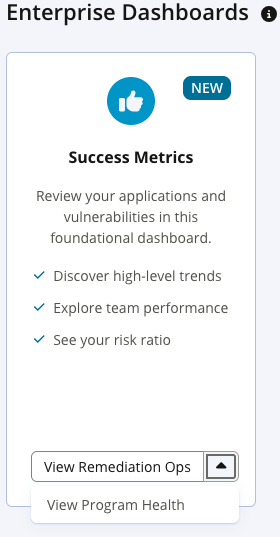
The redesigned dashboards also introduce expanded analytics and usability improvements. New remediation visualizations provide immediate visibility into open, closed, and remediated violations over time. Mean Time to Fix (MTTF) and remediation efficiency charts now include industry comparison benchmarks so organizations can better evaluate their performance against broader trends. Finally, a new executive summary section surfaces key organizational metrics before detailed analysis, enabling faster high-level assessment of security program health.
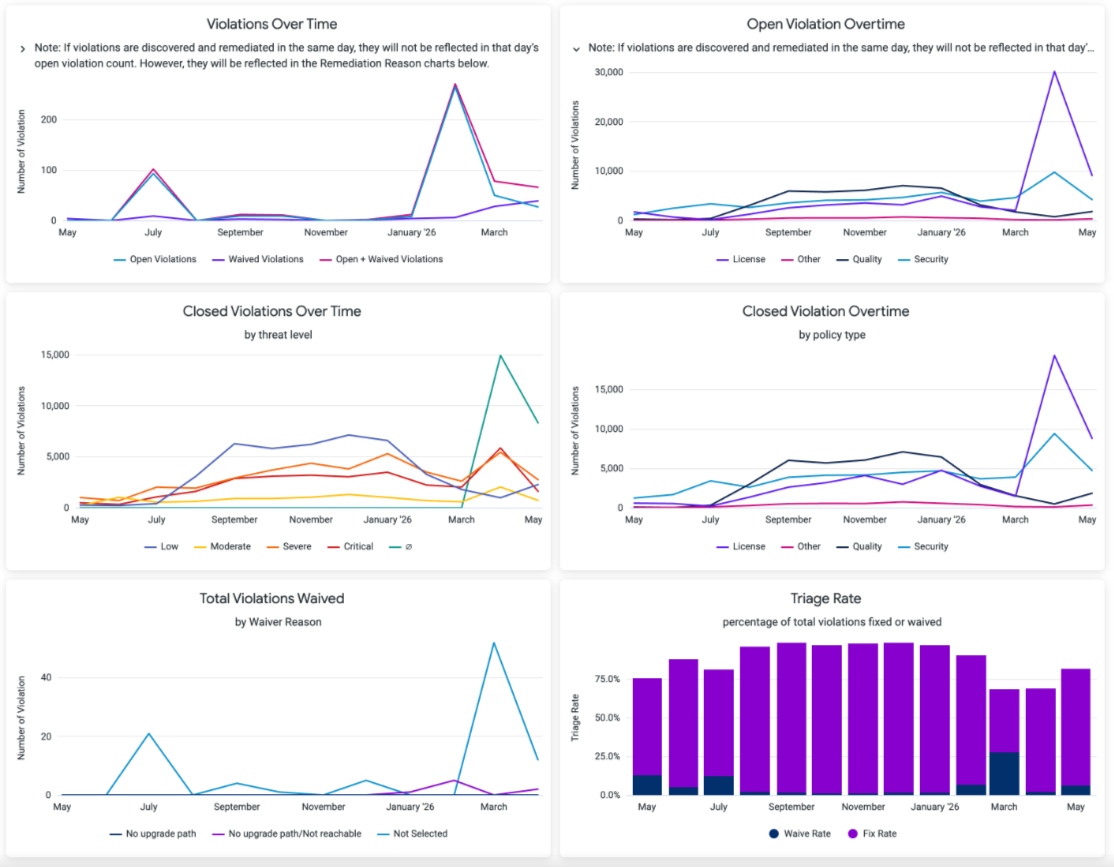
For full details, see the Success Metrics, Remediation Ops, and Program Health help pages.
Search Legal and Policy Violations in Advanced Search
Sonatype Lifecycle now supports searching for legal and policy violations via Advanced Search. You can leverage these new item types to find violations across applications and then refine results using criteria such as policy name, waiver status, and application name. This enhancement allows teams to more quickly locate relevant violations and prioritize remediation activities.
Configure Build Failures for Scans With Zero Components
Sonatype Lifecycle now supports a Scan Health configuration that lets you fail builds when a scan detects zero components. This capability helps you identify scans that may be misconfigured or otherwise producing incomplete results without treating scan health as a policy or component-risk evaluation. You can enable the behavior through a new REST API, with configuration that supports inheritance from organizations to child applications and application-level overrides.
When enabled, a scan with zero detected components returns a non-success result, but Lifecycle still submits the scan to IQ Server and creates a report so you can confirm that the scan occurred and review or export its results. Scans containing unknown components do not fail based on this Scan Health check; the existing behavior for unknown components remains unchanged.
Improved Legal Attribution Report Generation Performance
Legal Attribution Reports now generate more efficiently for applications with very large component inventories. This update reduces database load during report generation and helps maintain consistent application responsiveness for users across the platform.
 Sonatype Developer
This release does not include any Developer-specific changes.
 Sonatype SBOM Manager
This release does not include any SBOM Manager-specific changes.
 Sonatype Repository Firewall
This release does not include any Sonatype Repository Firewall specific changes.
Bug Fixes
Issue ID | Description |
|---|---|
NEXUS-52635 | Concurrent npm and PyPI proxy requests under PCCS now coalesce across cluster nodes, preventing uncoordinated IQ Server evaluation calls that could exhaust heap memory and cause a full Firewall outage. (This fix requires Nexus Repository 3.92.3+ and IQ 204+.) |
NEXUS-52385 | The IQ Server HDS connection pool size is now configurable, allowing HA/multi-node deployments to handle concurrent npm metadata requests without exhausting connections or falling back to stale cache data. |
NEXUS-52218 | The Malware Components CSV now reflects current Sonatype threat intelligence by automatically reconciling stored findings against up-to-date malicious status during the Automatic Malware Management task, so components whose malware classifications have been retracted or corrected no longer appear as active unresolved findings. |
NEXUS-51730 | Firewall integration users scoped to the Repository Manager level can now successfully retrieve the custom quarantine message without receiving 403 errors or generating spurious WARN log entries. |
NEXUS-51450 | The Automatic Malware Management task now correctly reports quarantine status in debug logs, accurately reflecting when malicious components are quarantined in the Firewall dashboard. Note that this fix requires coordinated deployment of Nexus Repository Manager and Sonatype IQ Server—deploying Nexus Repository without the corresponding IQ Server update (or vice versa) will cause firewall evaluation requests to fail. |
CLM-39884 | The Developer Priorities REST API documentation now explains the purpose of the |
CLM-39406 | Saving custom filters in Success Metrics and Enterprise Reporting now works correctly for LDAP users whose Distinguished Names exceed 50 characters. |
CLM-38656 | The Priorities report now displays a "Create PR" button instead of a stale link when a previously merged pull request's changes are reverted and a new scan detects the violation again. |
CLM-38299 | Saving a License Threat Group on large organizations completes in milliseconds, regardless of the number of descendant organizations or applications in the hierarchy. |
CLM-38233 | Policy name validation during support zip imports now uses a single bulk database query per policy instead of recursive traversal, reducing import time for large organization hierarchies from 15+ minutes to seconds. |
CLM-37819 | Automated pull requests are now created only when scanning the default branch, preventing unexpected PRs from appearing on the default branch during feature branch scans. |
CLM-35417 | Source control configuration validation now returns specific, actionable error messages—distinguishing between invalid repository URLs, authentication failures, and insufficient token permissions—instead of a generic failure message. |
CLM-31884 | The |
CLM-30626 | Application ID validation now blocks creation or updates when a public ID conflicts with an existing internal UUID, preventing UI crashes when viewing affected applications. |
Known Issues & Upgrade Guidance
This section captures known issues in the IQ 204 line as well as upgrade guidance.
Resolved Known Issues
Impacted Version(s) | Version in which Issue is Resolved | Description |
|---|---|---|
IQ Server 204 – 206 | 207 | For Windows users, the |