Service Account Tokens
Service account tokens provide a secure method for applications, automation tools, and CI/CD pipelines to authenticate with Nexus Repository without using individual user credentials.
A service account token is a named, role-scoped bearer token that can be assigned an optional expiration date. The permissions granted to a service account token are determined by its assigned role.
Prerequisites
The Nexus administrator must enable the Service Account Realm under Security > Realms before service account tokens can authenticate.
Ensure you have the required permissions to create and manage service account tokens.
For self-hosted deployments, move ServiceAccountRealm to Active under Security > Realms. The change takes effect immediately and does not require a restart. For Sonatype Nexus Repository Cloud deployments, the realm is already active.
Required Permissions
The Service Account Token feature uses the following privileges:
Privilege | Grants |
|---|---|
| View service accounts and tokens |
| Create, view, and revoke service account tokens |
Role assignment determines the effective permissions available when a service account token authenticates.
Note
Administrators who create or manage service account tokens in the UI must also have permission to view available roles (nx-roles-read). Without this permission, the role list cannot be displayed when creating a service account token.
Create a Service Account Token
Navigate to Settings > Security > Service Account Tokens.
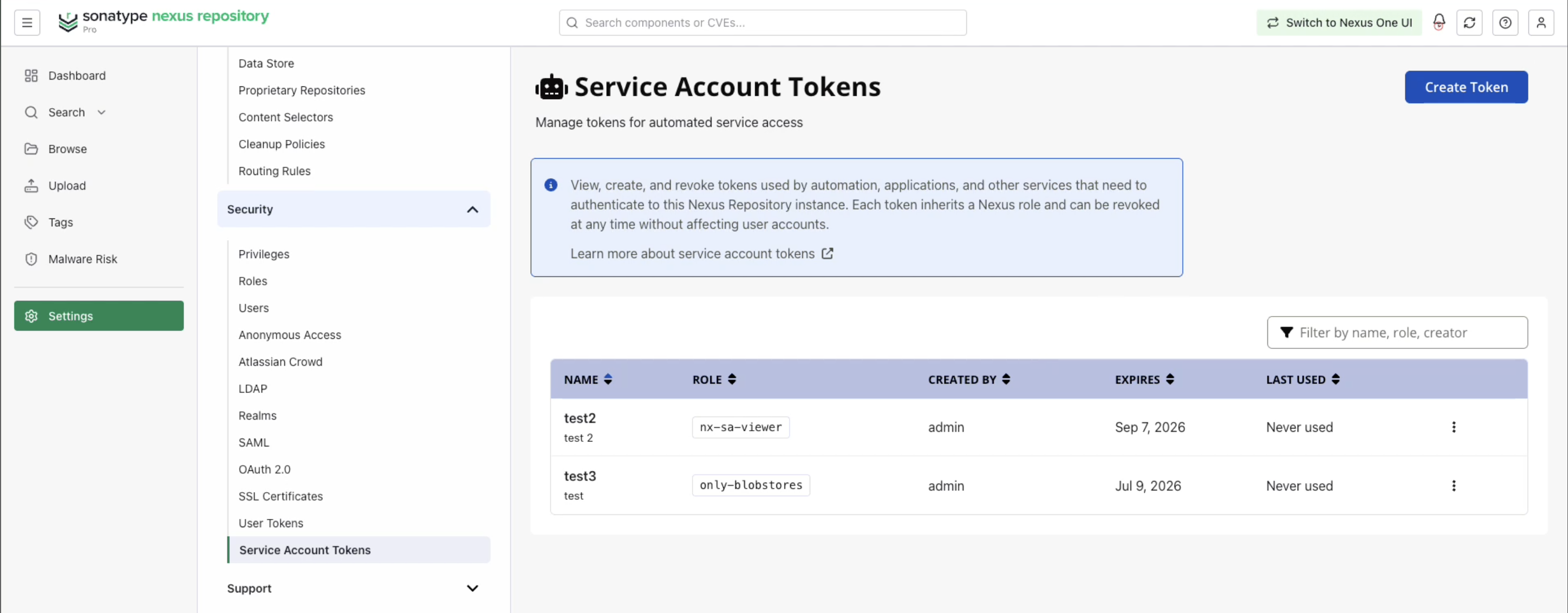
Click Create Token.
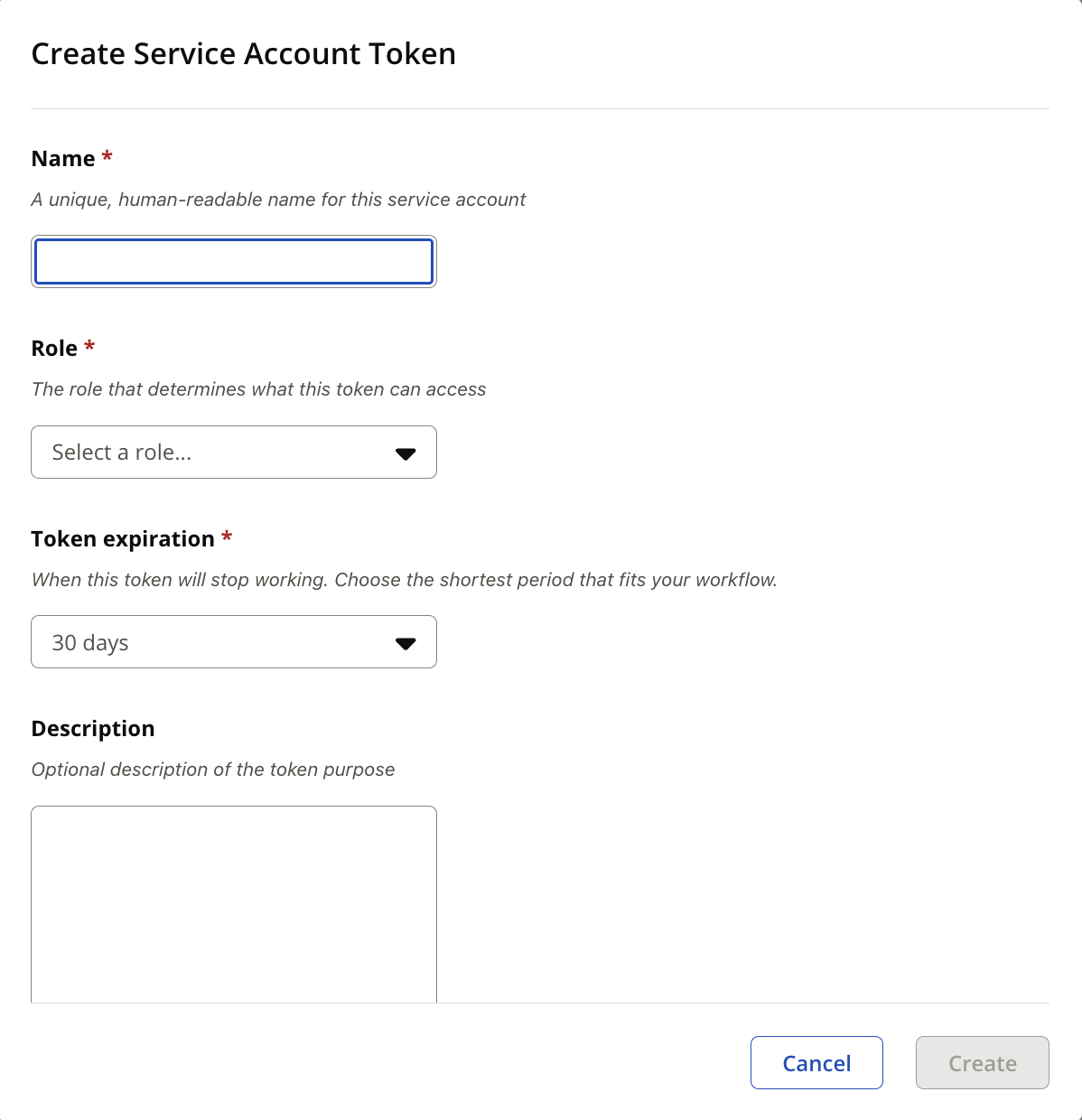
Enter a token name.
Select a role.
Select a token expiration value. Available options: 30 days, 60 days, 90 days, 1 year and Never.
Optional: Enter a description.
Click Create.
Token Requirements
Field | Requirement |
|---|---|
Name | Up to 128 characters. Use only letters ( |
Description | Maximum 256 characters |
Expiration | Specify a value greater than 0 or select Never expire. |
When the token is created successfully, Nexus Repository displays the generated token value.
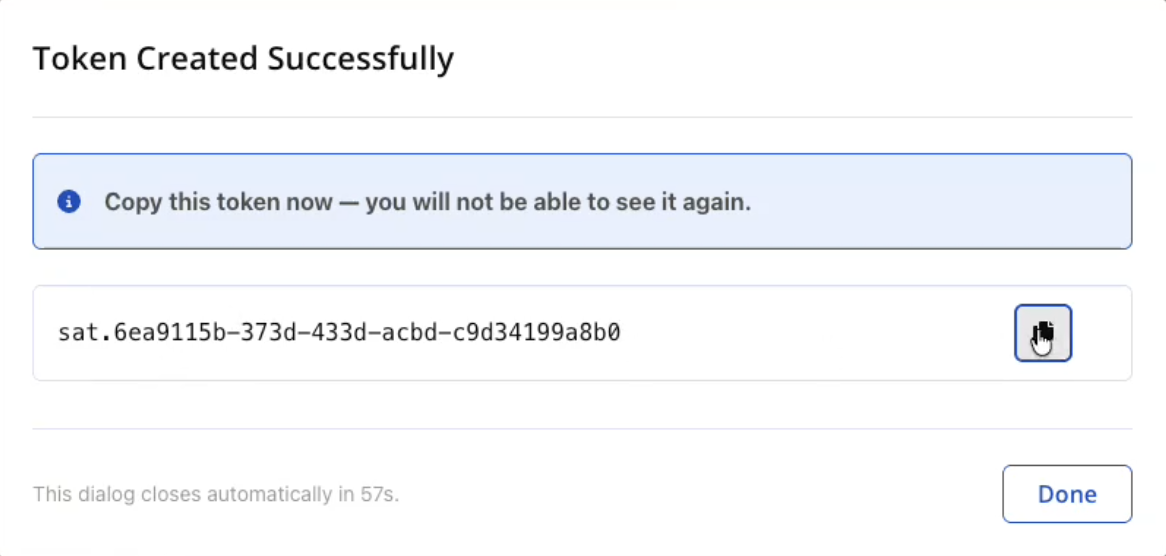
Note
The token value is displayed only once and cannot be retrieved later. Copy and securely store the token before closing the dialog.
Manage Service Account Tokens
The Service Account Tokens page displays information about existing tokens.
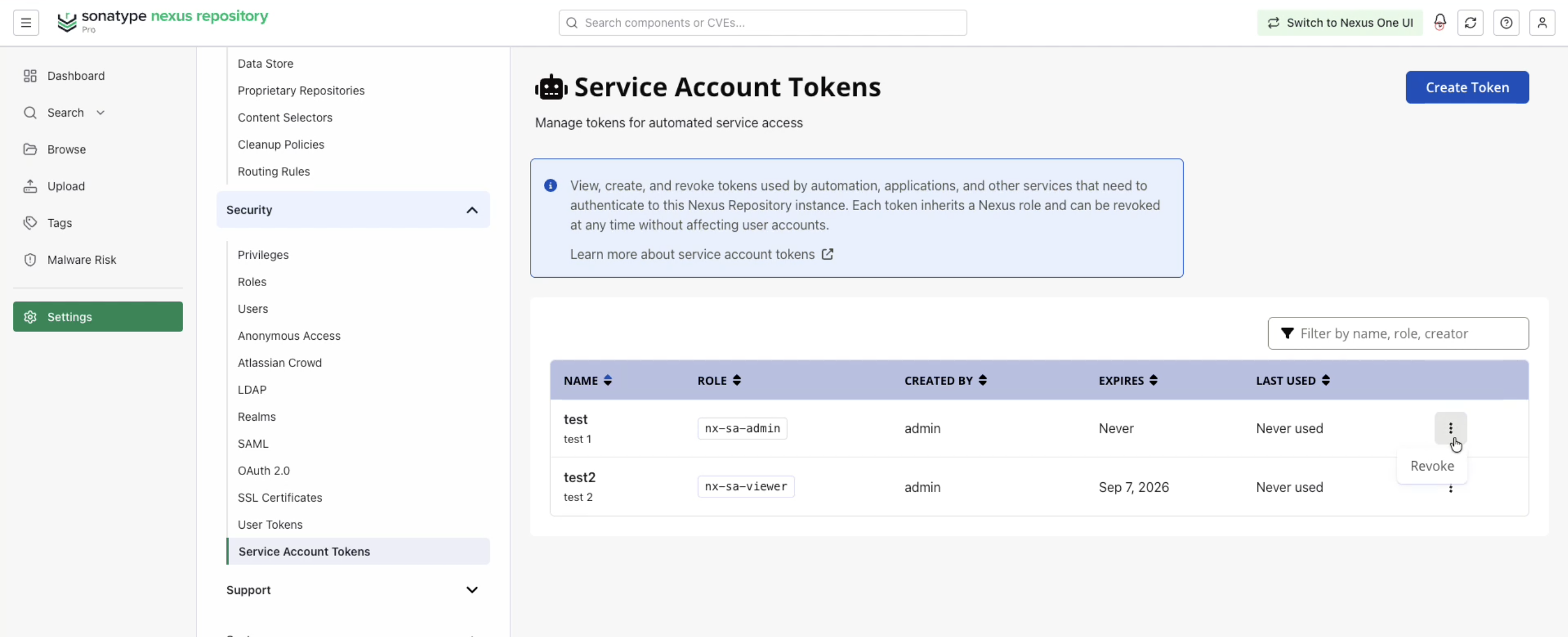
Field | Description |
|---|---|
Name | Token name |
Role | Assigned role |
Created By | User who created the token |
Expires | Token expiration date |
Last Used | Most recent token usage |
Use the available actions menu to manage existing service account tokens.
Authenticate Using a Service Account Token
Service Account Tokens authenticate in the following two ways:
Basic authentication: Use the service account name as the username and the service account token as the password.
Bearer authentication: Send the token in the Authorization header as a Bearer token. If the token is unknown, expired, revoked, or invalid, Nexus Repository returns a 401 Unauthorized response.
Most repository formats use HTTP Basic authentication, with the service account name as the username and sat.{token} as the password. Formats whose clients support it can instead send the token as a bearer token: Authorization: Bearer sat.{token}. The token is stored in the same place your client already stores credentials. If the token is unknown, expired, revoked, or invalid, Nexus Repository returns 401 Unauthorized.
Basic Authentication
Use Basic authentication when your repository client accepts a username and password. Use the following values for username and password:
Username: Service account name
Password: Service account token, such as
sat.<value>
Bearer Authentication
Use Bearer authentication only when your repository client can send an Authorization header.
Use the following header format:
Authorization: Bearer sat.<value>
Revoke a Service Account Token
Revoke a service account token when it is no longer required.
Navigate to Settings > Security > Service Account Tokens.
Locate the token you want to revoke.
Open the actions menu for the token.
Select Revoke.
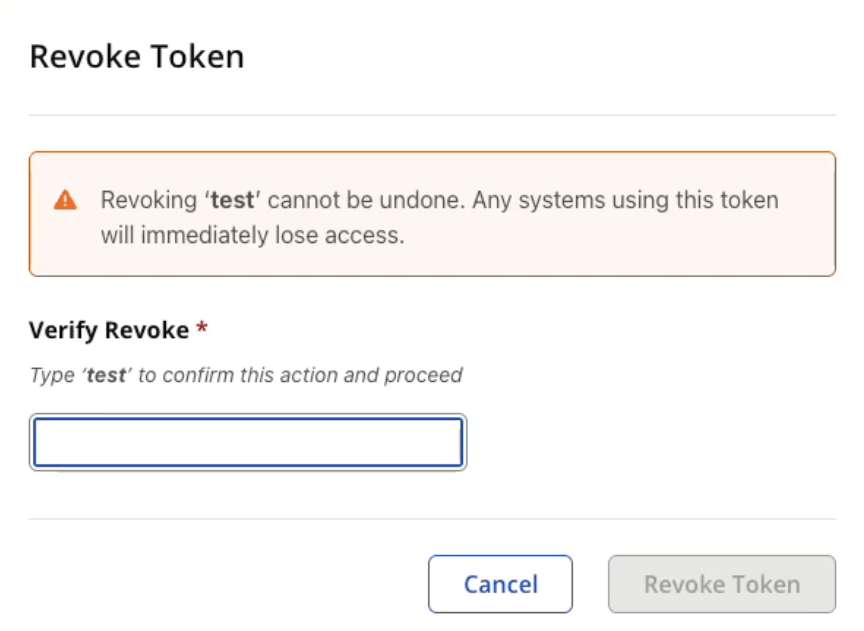
Confirm the action when prompted.
After a token is revoked, it can no longer be used for authentication.
Note
Revoking a service account token immediately removes its ability to authenticate requests.
Operational Considerations
Consider the following when managing service account tokens:
Audit Events
Audit events are generated when service account tokens are:
Created
Revoked
Removed during expiration cleanup
After a token is revoked, the audit log serves as the only persistent record of the token.
Cleanup Task
An expired service account token cleanup task runs daily by default.
Tokens configured with Never expire are excluded from cleanup.
Rate Limiting
Bearer-token rate limits apply to service account tokens (
sat.*).
Repository Format Support
All supported repository formats accept service account tokens. The Basic and Bearer columns in the following table indicate which authentication methods are supported by the standard client tools for each format.
If the Bearer column shows No, configure the client to send the service account token with Basic authentication as the standard client tooling for that format does not support sending it as a Bearer token
Format | Basic | Bearer |
|---|---|---|
Alpine | Yes | No |
Ansible Galaxy | Yes | No |
APT | Yes | No |
Cargo | Yes | Yes |
CocoaPods | Yes | No |
Composer | Yes | Yes |
Conan | Yes | No |
Conda | Yes | No |
Docker | Yes | No |
Git LFS | Yes | Yes |
Go | Yes | Yes |
Helm | Yes | No |
Hugging Face | Yes | Yes |
Maven | Yes | Yes |
npm | Yes | Yes |
NuGet | Yes | No |
OCI | Yes | No |
p2 | Yes | No |
Pub | Yes | Yes |
PyPI | Yes | No |
R | Yes | Yes |
Raw | Yes | Yes |
RubyGems | Yes | No |
Swift | Yes | Yes |
Terraform | No | Yes |
Yum | Yes | No |
Terraform is the exception to the usual Basic authentication pattern. Terraform clients use Bearer authentication through a credentials block and do not use a username-and-password credential pair.
Do not put a service account token in the NuGet API key field, --api-key, or X-NuGet-ApiKey. Use the service account token as the password. Push and restore operations do not require a NuGet API key when the client authenticates with the service account name and token.
Formats With Basic And Bearer Options
For most formats, place the service account name and token wherever the client stores a username and password. The following formats need additional guidance because their clients can use Bearer authentication, require a special credential format, or use a different authentication pattern.
Cargo
Cargo sends the stored token value as the Authorization header. Include the authentication scheme in the stored token value.
Configure the registry in ~/.cargo/config.toml:
[registries]
nexus = { index = "sparse+https://example.nexus.com/repository/cargo-hosted/" }

[registry]
global-credential-providers = ["cargo:token"]
In ~/.cargo/credentials.toml:
# Bearer
[registries.nexus]
token = "Bearer sat.<value>"

# Basic — base64 of "<account>:sat.<value>"
[registries.nexus]
token = "Basic bmV4dXMtc2E6c2F0LmV4YW1wbGU="
Composer
Composer authentication is configured in auth.json in the project directory or in ~/.composer/auth.json. Configure credentials by hostname, not by full repository URL.
{
  "http-basic": {
    "example.nexus.com": {
      "username": "<account>",
      "password": "sat.<value>"
    }
  }
}
{
"bearer": {
"example.nexus.com": "sat.<value>"
}
}Git LFS
For Basic authentication, use ~/.netrc:
machine example.nexus.com
login <account>
password sat.<value>
For Bearer authentication, configure the repository to send the Authorization header:
git config http.extraHeader "Authorization: Bearer sat.<value>"
Go
For Basic authentication, use ~/.netrc with GOAUTH=netrc. For Bearer authentication, use Go 1.24 or later and configure a GOAUTH helper command. The helper command prints the URL prefix and headers to attach to matching requests:
#!/bin/sh
printf 'https://example.nexus.com/repository/go-proxy/\n\nAuthorization: Bearer sat.<value>\n\n'
Then configure GOAUTH and GOPROXY:
export GOAUTH="/path/to/goauth-nexus.sh"
export GOPROXY="https://example.nexus.com/repository/go-proxy/,direct"
The Go toolchain sends GOAUTH credentials over HTTPS. If you use plain HTTP, the header is not sent and the request can return 401 Unauthorized.
Hugging Face
For Hugging Face repositories, use the environment variable or CLI login flow so the client sends the service account token as a Bearer token. Set the Hugging Face endpoint and token:
export HF_ENDPOINT=https://example.nexus.com/repository/huggingface-proxy
export HF_TOKEN=sat.<value>
You can also use huggingface-cli login and enter the service account token when prompted. For Basic authentication, omit HF_TOKEN and include the service account name and token in HF_ENDPOINT.
Maven
For Basic authentication, configure the server entry in ~/.m2/settings.xml:
<server>
  <id>nexus</id>
  <username><account></username>
  <password>sat.<value></password>
</server>
For Bearer authentication, configure the Authorization header in the same server entry. Do not include a username or password in this server entry because Maven can fall back to those values and hide a rejected token.
<server>
  <id>nexus</id>
  <configuration>
    <httpHeaders>
      <property>
        <name>Authorization</name>
        <value>Bearer sat.<value></value>
      </property>
    </httpHeaders>
  </configuration>
</server>
npm
For Bearer authentication, use _authToken` in .npmrc:
registry=https://example.nexus.com/repository/npm-group/
//example.nexus.com/repository/npm-group/:_authToken=sat.<value>
For Basic authentication, use _auth in .npmrc. The _auth value is the base64-encoded value of <account>:sat.<value>
registry=https://example.nexus.com/repository/npm-group/
always-auth=true
//example.nexus.com/repository/npm-group/:_auth=<base64-encoded-account-and-token>
Running npm login with the service account name and token also writes a working .npmrc configuration.
Pub
Use dart pub token add and enter the service account token when prompted:
dart pub token add https://example.nexus.com/repository/pub-hosted/
For CI environments, read the token from an environment variable:
dart pub token add https://example.nexus.com/repository/pub-hosted/ --env-var NEXUS_TOKEN
R
For Bearer authentication, configure download headers in .Rprofile:
options(repos = c(NEXUS = "https://example.nexus.com/repository/r-group"))
options(renv.download.headers = function(url) {
  c(Authorization = paste("Bearer", Sys.getenv("NEXUS_TOKEN")))
})
For Basic authentication, include the service account name and token in the repository URL:
options(repos = c(
  NEXUS = "https://<account>:sat.<value>@example.nexus.com/repository/r-group"
))
Swift
For Basic authentication, configure ~/.netrc:
machine example.nexus.com
login <account>
password sat.<value>
For Bearer authentication, configure ~/.netrc with token as the login value:
machine example.nexus.com
login token
password sat.<value>
For Bearer authentication, the host must not have an authentication entry in registries.json because that entry takes precedence.
Terraform
Terraform and OpenTofu use Bearer authentication through the credentials block in ~/.terraformrc or terraform.rc on Windows:
credentials "example.nexus.com" {
  token = "sat.<value>"
}
Do not use a username-and-password credential pair for Terraform service account authentication.
REST API
Service account tokens can also be managed using the Nexus Repository REST API.
Service account token endpoints are available under:
/v1/security/service-account-tokens
Method | Path | Required permission |
|---|---|---|
GET |
|
|
POST |
|
|
DELETE |
|
|
For endpoint details, request payloads, authentication requirements, and response examples, see the Nexus Repository API Reference.
Security Considerations
Follow these recommendations when using service account tokens:
Treat service account tokens (
sat.*) as secrets.Store tokens in a secure secret-management solution.
Never commit service account tokens to source control.
Prefer time-limited tokens whenever possible.
Use never expire sparingly.
Assign the least-privileged role required for the CI/CD job or automation process.