Understanding the Shai-Hulud npm Worm Attack
What happened, why it matters, and how Sonatype protects you from npm and Shai-hulud attacks
Recent software supply chain attacks, such as the Chalk/Debug campaign (Sonatype ID: sonatype-2025-003716), the S1ngularity event (Sonatype ID: sonatype-2025-003584), and the Shai-Hulud campaign (Sonatype ID: sonatype-2025-003810), have seen threat actors compromise developer accounts to publish malicious versions of popular npm packages. These attacks are sophisticated, with payloads designed to steal credentials, exfiltrate sensitive data, and even self-propagate like a worm; an incredibly dangerous adaptation for malware. An evolution in the Shai-Hulud campaign (Sonatype ID: sonatype-2025-007248) added new techniques for faster, more disruptive self-propagation.
This escalation in attack sophistication underscores the critical importance of a proactive defense. Sonatype Repository Firewall provides real-time, preventative protection by automatically blocking these malicious components before they can be downloaded into your environment. When a malicious component is identified, Firewall quarantines it, ensuring your builds and development pipelines remain secure.
What to do if your files have been compromised
Note
Prerequisites
To take advantage of the remediation steps outlined below, customers must be on Nexus Repository Manager Pro version 3.73.0 or higher. Customers must also have Sonatype Repository Firewall, and the IQ Server and Nexus Repository Manager must be connected.
If a malicious component was downloaded before Repository Firewall was properly configured, you can use the following steps to find and remove it:
Using Nexus Repository Manager:
Check for the Malware Banner on your Repository Manager dashboard (Version 3.73.0 or higher), which indicates that a malicious component has been identified. Download a CSV list of components from the Malware Banner.
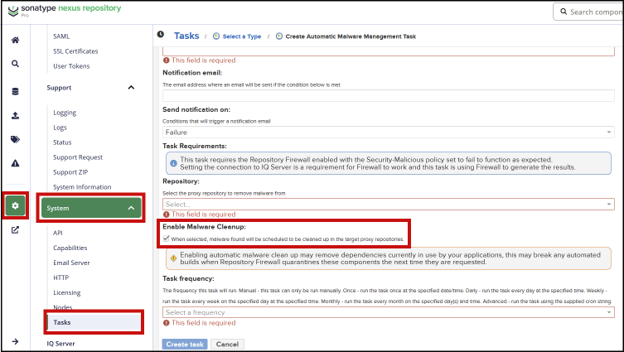
To remove the malicious components, run the Automatic Malware Management task on the affected proxy repositories( Version 3.77.0 or higher ). This task, when enabled with Enable Malware Cleanup, will automatically delete the malicious components from your repository. For details, including instructions for creating the task, refer to the Automatic Malware Management task documentation.
 |
Using IQ Serve r:
Utilize Advanced Search in IQ Server to find any violations related to these specific attacks. Use the following search criteria:
vulnerabilityId:sonatype-2025-003584 OR vulnerabilityId:sonatype-2025-003716 OR vulnerabilityId:sonatype-2025-003810 OR vulnerabilityId:sonatype-2025-007248
To search for Shai-Hulud packages exclusively, use the following search criteria.
vulnerabilityId:sonatype-2025-003810 OR vulnerabilityId:sonatype-2025-007248
If Advanced Search returns results, then a Lifecycle scan has identified these components in your codebase. Follow your internal incident response policy and aim to remove those packages from your builds and manifest files immediately.
For a comprehensive guide on the manual process of removing malware and handling the malware banner, please consult the Guide to Removing Malware.
Check now that your deployments of Nexus Repository and Repository Firewall are correctly configured to block malware
Open Repository Firewall and:
Confirm that all proxy repositories for the npm ecosystem have Audit and Quarantine enabled. Sort the list by Format to quickly identify npm proxy repositories.
 |
Read more: Audit and Quarantine documentation
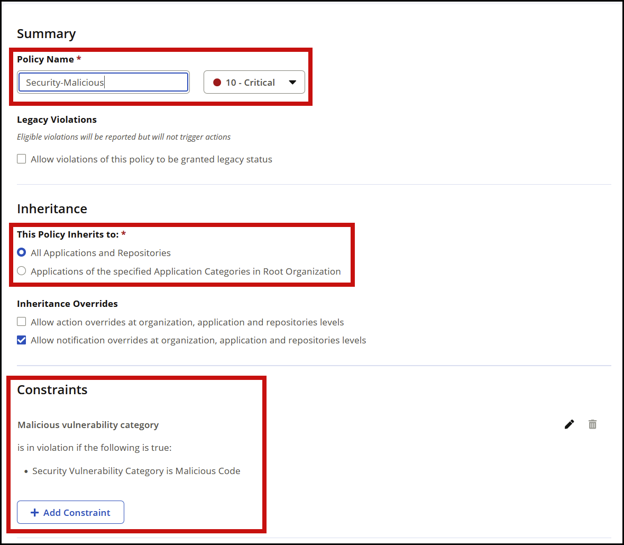
Confirm that your Integrity-Rating and Security-Malicious policies are configured correctly. Make sure they match these screenshots exactly, including the Policy Name field.
Integrity-Rating:
 |
To understand the protection provided by the Release Integrity policy, please see our Release Integrity documentation. Policy Compliant Component Selection should also be considered in conjunction with this policy to minimize impact from the latest suspicious packages.
Security-Malicious:
 |
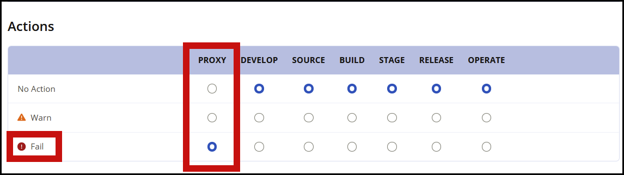
Confirm that both of these policies are set to "Fail" at the proxy stage.
 |
If all of these things are confirmed, congratulations: You're protected against these npm malware attacks and the 850,000+ other malicious packages Sonatype has cataloged!
Demo: Configuring Nexus Repository and Repository Firewall
The interactive demo below walks you through configuring the Automatic Malware Management task in Nexus Repository and the Integrity-Rating and Security-Malicious policies in Repository Firewall. Select the Next button below to navigate through the interactive demo.
Next Steps
Malware attacks are more frequent, more sophisticated, and more dangerous than ever. Maximize your protection against future malware attacks by doing the following:
Review the Integrity-Rating and Security-Malicious policies on a regular cadence and ensure they're set to "Fail" at the Proxy stage. If you're also a Sonatype Lifecycle customer, it's wise to set them to "Fail" at every stage. Also make sure the every proxy repository has the “Audit and Quarantine” capability. Remember – there's never a legitimate reason for malware to be in your development ecosystem.
Eliminate development disruption caused by the Integrity-Rating policy by also configuring Policy Compliant Component Selection.
Consider setting the Component-Unknown policy to also fail at the proxy stage. This protects you from malware that Sonatype hasn’t yet ingested or evaluated. This step provides extra protection against malware events.
Enable Automatic Quarantine Release so that components are released from quarantine automatically if new data confirms they're safe. This avoids developer friction and minimizes "false positives."
If you're a Sonatype Lifecycle or Sonatype SBOM Manager customer, turn on Continuous Monitoring. This will alert stakeholders if malware appears in your apps unexpectedly.
Educate developers on the importance of routing component requests through Nexus Repository. All requests for open-source components, regardless of ecosystem or package manager, should go through Nexus Repository.
For additional protection, integrate Repository Firewall with Zscaler to block downloads of known malware even when developers bypass Nexus Repository.