Configure NuGet With Nexus
Note
NuGet clients do not pass through Repository Firewall report links and messaging when components are quarantined. Quarantine returns a 409 status code instead of 403.
Nexus Repository supports standard NuGet v2 and v3 repository APIs used by NuGet CLI, Visual Studio, and the .NET CLI. Some third-party NuGet-compatible clients implement additional query optimizations when interacting with repositories. In certain cases, these client-specific optimizations may not behave consistently across all repository implementations. This behaviour does not indicate that Nexus Repository lacks support for NuGet repositories or that deprecated APIs are being used, and it is not related to the database backend. Migrating from OrientDB to PostgreSQL does not affect NuGet API compatibility.
Whenever you mention your V3 repository URL, append
/index.jsonto the URL so the NuGet client auto-detects the V3 protocol. Without the/index.jsonsuffix, the NuGet client may auto-detect V2 (OData) from the group root URL. This causes a protocol mismatch (especially for group repositories) and the client receives a 502 error. Always include/index.jsonin the source URL when pointing at a V3.
Configure NuGet-compatible clients to connect to and authenticate to Nexus Repository. Before configuring clients, ensure you have created a NuGet repository in Nexus. See Create a NuGet repository.
NuGet.Config is an XML file that stores NuGet settings, including package sources and credentials. Configure the NuGet.Config file to connect the NuGet compatible clients with Nexus NuGet repository. The common locations for NuGet.Config file are:
macOS/Linux:
~/.config/NuGet/NuGet.configWindows:
%appdata%\NuGet\NuGet.config
Configure a Package Source in NuGet.Config
Add a new <packageSource> with a unique key and the URL of your NuGet group repository. Use the following syntax to configure a package source in NuGet.Config file:
<configuration>
  <packageSources>
    <clear />
    <add key="Nexus" value="<repository-url>" />
  </packageSources>
</configuration>
Where,
key- Name for the package source. For example,NexusorNexusGroup.<repository-url>- Your Nexus NuGet repository URL<clear />- Removes default NuGet sources for this configuration scope. Omit it if you want to keep inherited sources.
The following example configures a NuGet v3 group repository as the only package source:
<configuration>
  <packageSources>
    <clear />
    <add key="nuget.org" value="https://api.nuget.org/v3/index.json" />
    <add key="Nexus" value="https://example.nexus.com/repository/nuget-group/index.json" />
  </packageSources>
</configuration>
Configure Credentials
Configure authentication with Nexus Repository by adding the packageSourceCredentials section in NuGet.Config file. Sonatype recommends using API tokens instead of basic authentication credentials:
<packageSourceCredentials>
  <Nexus>
    <add key="Username" value="%NEXUS_USERNAME%" />
    <add key="ClearTextPassword" value="%NEXUS_PASSWORD%" />
  </Nexus>
</packageSourceCredentials>
Where,
Nexus- Package source key defined in thepackageSourcessection%NEXUS_USERNAME%- Your Nexus username or usertoken name code%NEXUS_PASSWORD%- Your Nexus password or usertoken passcode
Example:
<configuration>
  <packageSources>
    <clear />
    <add key="Nexus" value="https://example.nexus.com/repository/nuget-group/index.json" />
  </packageSources>
  <packageSourceCredentials>
    <Nexus>
      <add key="Username" value="admin" />
      <add key="ClearTextPassword" value="admin123" />
    </Nexus>
  </packageSourceCredentials>
</configuration>
Example to configure both group (consumption) and hosted (publish) repositories in NuGet V3:
<configuration>
  <packageSources>
    <clear />
    <add key="Nexus" value="http://example.nexus.com/repository/nuget-group/index.json" />
    <add key="NexusHosted" value="http://example.nexus.com/repository/nuget-hosted/index.json" />
  </packageSources>
  <packageSourceCredentials>
    <Nexus>
      <add key="Username" value="admin" />
      <add key="ClearTextPassword" value="admin123" />
    </Nexus>
    <NexusHosted>
      <add key="Username" value="admin" />
      <add key="ClearTextPassword" value="admin123" />
    </NexusHosted>
  </packageSourceCredentials>
</configuration>
Example to configure both group (consumption) and hosted (publish) repositories in NuGet V2:
<configuration>
  <packageSources>
    <clear />
    <add key="Nexus" value="http://example.nexus.com/repository/nuget-group" />
    <add key="NexusHosted" value="http://example.nexus.com/repository/nuget-hosted/" />
  </packageSources>
  <packageSourceCredentials>
    <Nexus>
      <add key="Username" value="admin" />
      <add key="ClearTextPassword" value="admin123" />
    </Nexus>
    <NexusHosted>
      <add key="Username" value="admin" />
      <add key="ClearTextPassword" value="admin123" />
    </NexusHosted>
  </packageSourceCredentials>
</configuration>Users with the nx-apikey-all privilege may access the NuGet API key feature. Using API keys requires the NuGet API-Key Realm to be activated. See Realms for more details.
To access your API Key, navigate to My Account → NuGet API Key → Access API Key.
This user specific key can be used for all NuGet repositories. If the key is regenerated, the previous keys would become invalid.
nuget setapikey <API_key> -Source <source_URL>
Note that the dotnet CLI does not directly support the setapikey command. The dotnet CLI uses user tokens for authentication with NuGet sources. To access usertoken, navigate to My Account → User Token → Access User Token.
You can also use environment variables to store credentials instead of hardcoding them in configuration files.
Linux/macOS
export NUGET_USERNAME="user-token"
export NUGET_API_KEY="user-token-pass-code"
Windows (Command Prompt)
setx NUGET_USERNAME "user-token"
setx NUGET_API_KEY "user-token-pass-code"
After setting environment variables, reference them in your NuGet.Config using the %VARIABLE_NAME% syntax.
Configure through .NET CLI
Use the dotnet nuget commands to configure package sources without manually editing configuration files.
dotnet nuget add source "<repository-url>" \
  --name "<source-name>" \
  --username "<username>" \
  --password "<password-or-token>"
Where,
<repository-url>- Your Nexus NuGet repository URL<source-name>- Package source name, for exampleNexus<username>- Your Nexus Repository username or usertoken name code<password- Your Nexus Repository password or usertoken pass code
Example:
dotnet nuget add source "https://nexus.example.com/repository/nuget-group/index.json" \
  --name "Nexus" \
  --username "admin" \
  --password "admin123"
If you have already added the source and need to configure authentication, update your NuGet.Config file with credentials or use environment variables.
Sonatype recommends removing the default sources and only using Nexus Repository for retrieving packages. Use the dotnet nuget remove source command with the --name option to remove each source individually. It modifies the user-level nuget.config file. To clear sources for a specific project or solution, you'll need to run the command within the respective directory. Use dotnet nuget list source again to verify that they have been removed from your configuration.
dotnet nuget list source

dotnet nuget remove source --name "source_name_1"
dotnet nuget remove source --name "source_name_2"
You can also specify the source directly when using NuGet commands:
dotnet add package Newtonsoft.Json --source http://example.nexus.com/repository/nuget-group/index.json
 --username "your-nexus-username" --password "your-nexus-api-key"
Visual Studio Integration
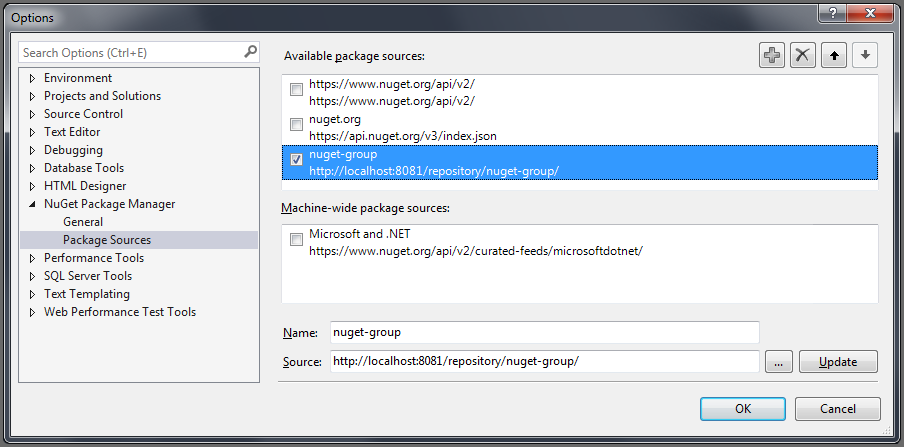
To access a NuGet repository provide the URL from the repository manager to configure Name and Source in the Visual Studio configuration for the Package Sources of the NuGet Package Manager.
With this configuration in place, packages available in your NuGet repository are available in the NuGet Package Manager in Visual Studio.
Configure Chocolatey CLI
Configure Chocolatey CLI to use Nexus Repository as the package source. Run the following command in an elevated (Administrator) PowerShell or Command Prompt:
choco source add `
  --name="<source-name>" `
  --source="<repository-url>" `
  --user="<username>" `
  --password="<password-or-token>"
Where,
<source-name>- Package source name, for exampleNexus<repository-url>- Your Nexus NuGet repository URL<username>- Your Nexus Repository username or usertoken name code<password-or-token>- Your Nexus Repository password or usertoken pass code or NuGet API Key
Example:
choco source add `
  --name="nexus" `
  --source="https://example.nexus.com/repository/chocolatey/" `
  --user="admin" `
  --password="admin123"
Example to associate an API Key with a hosted repository using environmental variables:
choco apikey add
--source="https://nexus.example.com/repository/nuget-hosted/" `
--key="$env:NUGET_API_KEY"
Note
API Key setup is required to push choco packages to hosted repositories.
Configure .NET Debuggers
Any SymSrv-compliant debugger can be pointed at a Nexus Repository symbol server URL. This section covers the common configuration methods for .NET debuggers. In all the cases, use the following URL structure for the debugger:
http://<nexus-host>:<nexus-port>/repository/<repository-name>/symbols
Where,
<nexus-host>- Your local Nexus host<nexus-port>- Your local Nexus port<repository-name>- Your Nexus repository name, for examplenuget-group
Configure NuGet.Config for Package Restore
Configure dotnet restore and dotnet build to fetch packages from Nexus Repository by adding a source entry in your NuGet.Config file.
<configuration>
  <packageSources>
    <clear />
    <add key="Nexus"
         value="http://your-nexus-server:8081/repository/nuget-group/index.json"
         allowInsecureConnections="true" />
  </packageSources>
  <packageSourceCredentials>
    <nexus>
      <add key="Username" value="your-username" />
      <add key="ClearTextPassword" value="your-password" />
    </nexus>
  </packageSourceCredentials>
</configuration>
Where,
Nexus- Package source key defined in thepackageSourcessectionyour-username- Your Nexus username or usertoken name codeyour-password- Your Nexus password or usertoken pass code or NuGet API Key
dotnet-symbol CLI
dotnet-symbol is Microsoft's cross-platform CLI for downloading symbols by GUID + age. It runs on Windows, macOS, and Linux.
After installing the dotnet-symbol, download symbols for a binary using Nexus Repository as the symbol source:
dotnet-symbol --symbols \
  --server-path http://your-nexus-server:8081/repository/nuget-group/symbols \
  /path/to/MyLibrary.dll
Where,
--server-path- Your Nexus Repository symbol server URL/path/to/MyLibrary.dll- The path to the binary file
dotnet-symbol reads the debug directory of MyLibrary.dll, constructs the SymSrv URL (/symbols/MyLibrary.pdb/{signatureHash}/MyLibrary.pdb), fetches the PDB from Nexus Repository, and places it next to the binary.
To download symbols for every DLL in a directory, add --recurse-subdirectories and pass the directory path. See the dotnet-symbol --help output for additional flags.
Note
dotnet-symbol does not send authentication credentials on symbol requests. If your Nexus Repository is not configured to allow anonymous symbol access, dotnet-symbol will fail with an authentication error. Select the Allow Anonymous Symbol Access checkbox while creating the proxy repository.
VS Code
vsdbg is the debugger used by Visual Studio Code's C# extension for .NET debugging. Configure it via .vscode/launch.json.
{
  "version": "0.2.0",
  "configurations": [
    {
      "name": ".NET Core Launch (console)",
      "type": "coreclr",
      "request": "launch",
      "program": "${workspaceFolder}/bin/Debug/net8.0/MyApp.dll",
      "cwd": "${workspaceFolder}",
      "console": "internalConsole",
      "symbolOptions": {
        "searchPaths": [
          "http://your-nexus-server:8081/repository/nuget-group/symbols"
        ],
        "searchMicrosoftSymbolServer": false,
        "searchNuGetOrgSymbolServer": false
      }
    }
  ]
}
Set searchMicrosoftSymbolServer and searchNuGetOrgSymbolServer to false if you want Nexus Repository to be the only symbol source. Leave them true (or omit them) to fall back to Microsoft's or NuGet.org's public symbol servers when a symbol is not found in Nexus Repository.
On Windows platforms, Visual Studio's C# extension for VS Code uses the same symbolOptions schema. If you use Visual Studio and not VS Code, configure the symbol source under Tools → Options → Debugging → Symbols by adding the Nexus Repository URL to the Symbol file (.pdb) locations list. Uncheck Microsoft Symbol Servers if you want Nexus Repository to be the exclusive symbol source.
Note
Both dotnet-symbol and vsdbg construct the sub-path (/{filename}/{signatureHash}/{filename}) themselves. Supply only the base URL that ends in /symbols.
Disable NuGet Symbol Server Support
NuGet Symbol Server support is available in Nexus Repository 3.95.0 and later. If NuGet symbol-package processing causes an unexpected behaviour after an upgrade, you can disable NuGet Symbol Server support by adding a setting to nexus.properties.
nexus.nuget.symbol.server.enabled=false
Restart Nexus Repository after updating nexus.properties.