Configure Policies
Firewall Enterprise uses policies to decide whether to allow or block requested components. For each request, it evaluates the component against the policies that apply to that Policy Gateway and takes a defined action based on the violations it finds.
Policies define which risks to look for and how to prioritize them. Sonatype’s reference policies, which are immediately available in Firewall Enterprise, provide a starting point for configuring your policies.
Policy Elements
When you define the policies that Firewall Enterprise uses, you will configure the elements below:
Policy Name
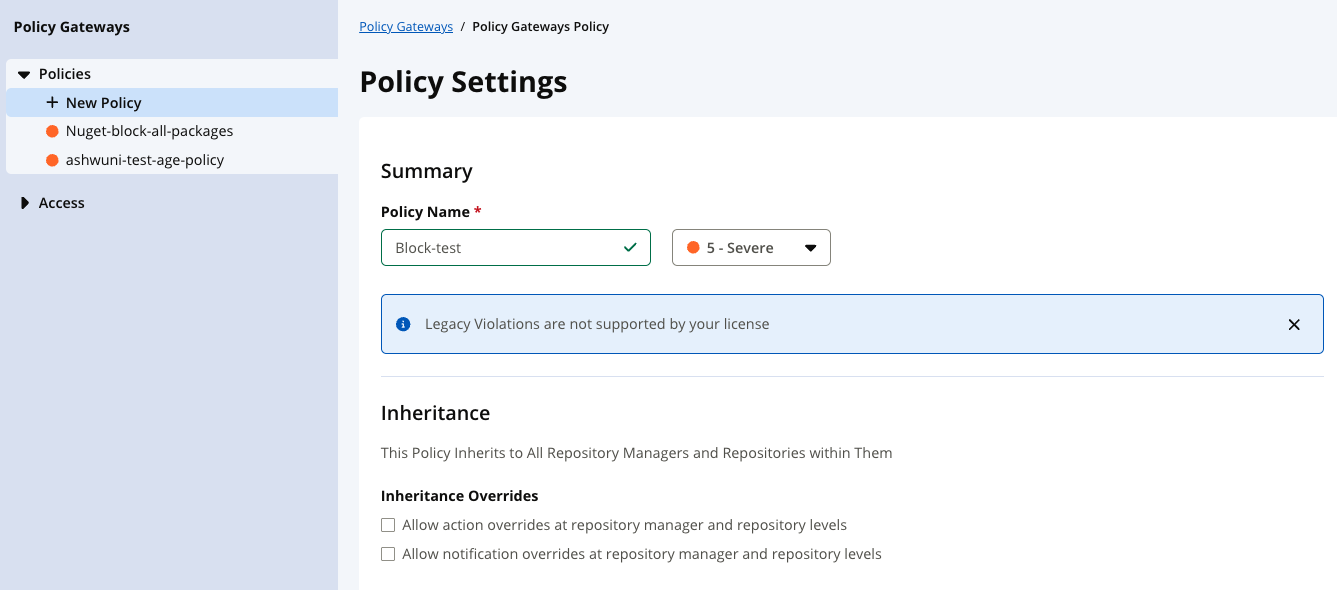
The Policy Name indicates the risk or violation it is associated with. Policy names must be unique within the same organization.
Policy Name can be up to 60 characters long and include alphanumeric, underscores (_), periods (.), dashes (-), or spaces.
Threat Level
The threat level is a subjective value on the perceived risk of a policy violation. Its purpose is for sorting policy violations in reports and views; the violations with the highest threat level appear first followed by those with lower threat levels.
The threat level values are grouped by severity and identified by specific colors
Avoid causing unnecessary alarm when setting the threat level
Select the lowest possible number that provides value; informational level (1) or low level (2-3)
Save the high-level values (8-10) for only the highest priority and risk.
Level | Color | Number |
|---|---|---|
Critical | Red | 8-10 |
Severe | Orange | 4-7 |
Moderate | Yellow | 2-3 |
Low | Blue | 1 |
None | Light Blue | 0 |
Inheritance
Policies are inherited downwards. A Policy Gateway applies its own policies plus every policy above it, and its proxy repositories use exactly what the Policy Gateway applies. The table below outlines what a policy will apply to based on the level at which it is configured:
Level | Applies to | Where to Configure in Repos and Policies |
|---|---|---|
Root Organization | Everything, including every Policy Gateway. The reference policies live here. | Root Organization, shown at the top when you have access to it > Policies |
Policy Gateways container | Every Policy Gateway and its proxy repositories | Policy Gateways > Policies |
Policy Gateway | That Policy Gateway's proxy repositories only | Policy Gateways > select a specific Policy Gateway > Policies |
Proxy repository | A proxy repository always uses its Policy Gateway's policies. It shows them read-only, so every proxy repository in a Policy Gateway reaches the same decision for the same component. | Not configurable |
Note
If you also use Sonatype Lifecycle, policies on Lifecycle organizations and applications don't apply to Policy Gateways.
Inheritance Overrides
Inheritance overrides can be used to let an individual Policy Gateway treat an inherited policy differently. For example, you might choose to configure Warn instead of Fail while you onboard a new repository manager.
Constraints
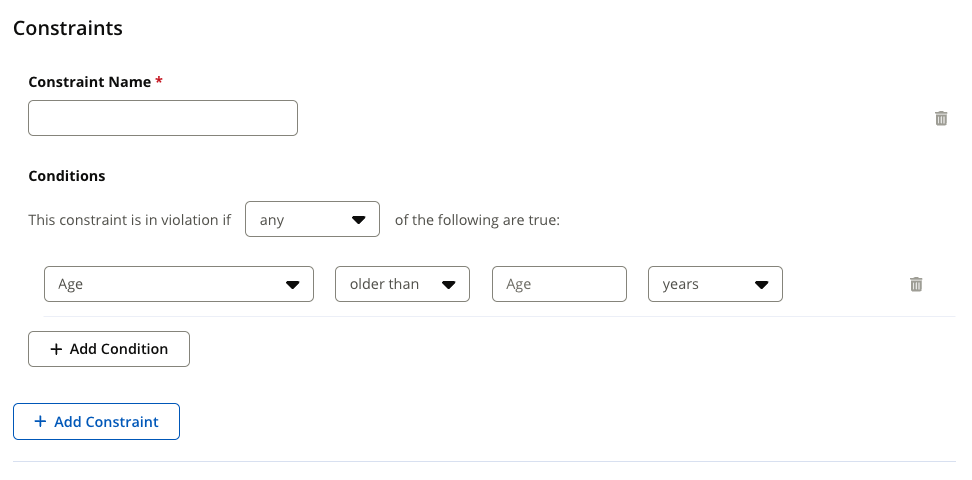
Policy constraints define the violating conditions to detect during a policy evaluation. A policy is considered in violation when any constraint of the policy evaluates to a true statement.
A policy must have at least one constraint and each constraint must have at least one condition.
Policy constraints may be configured to satisfy any or all of their conditions.
Policy constraints must have a unique name. These names are used as details for the policy violation.
Before configuring your first policy, review our detailed help documentation about policy constraints.
Actions
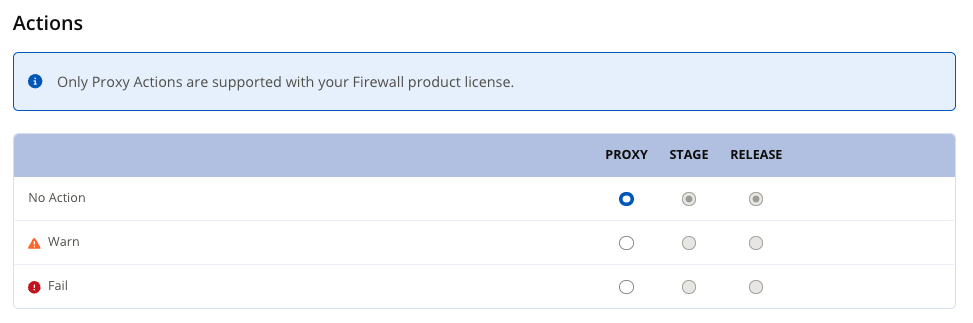
A policy's action decides what happens when a requested component violates the policy’s constraints:
Action | What Happens to the Request |
|---|---|
Fail | Blocked. The repository manager gets |
Warn | Allowed. The violation is recorded and shows in Policy Gateway Results. |
No Action | Allowed. The violation is recorded and shows in Policy Gateway Results. |
Note
Only the Proxy stage applies. The policy editor also shows Stage and Release, but with a Firewall Enterprise license, only Proxy can be set.
Notifications
Policy notifications are email notifications that contain a summary of policy violations that occur during an evaluation. These notifications can be delivered to email addresses. The emails are sent to individual addresses or users assigned to a particular role.
Create or Edit a Policy
You will define your policies under Repos and Policies. Begin defining your policy using the Policies section at either the root organization, the Policy Gateways container, or an individual Policy Gateway. Refer back to the table in the Inheritance section above to determine where you want to define your policy.
In Policies, select Add a Policy. To edit an existing policy, select it at the level where it was created; an inherited policy is read-only below that level.
Enter a unique Policy Name and choose a threat level.
If desired, select if you would like to allow action overrides and/or notification overrides at the repository manager and repository levels.
Under Constraints, add the conditions that make a component violate the policy. Refer back to our main Policy Constraints help documentation to understand the possible constraints you might define.
Under Actions, choose the action you wish to happen if the component violates policy constraints. Refer back to the table under Actions above for details on what each action does.
Define any notifications you wish to send out when policy violations occur.
Select Create (or Update).
When a Policy Change Takes Effect
A policy change applies to every component evaluated after you save it. Components Firewall Enterprise has already evaluated keep their recorded result until they are evaluated again:
A blocked component stays blocked until it is re-evaluated, even if you relax the policy or add a waiver. Use Re-evaluate Component, or re-evaluate the whole Policy Gateway from Policy Gateway Results.
An allowed component is answered from its recorded evaluation for up to a day, then evaluated again. To apply a stricter policy sooner, re-evaluate from Policy Gateway Results.
Configure the Recorded Evaluation Duration
Firewall Enterprise reuses the recorded evaluation of an allowed component for a limited time before evaluating the component again.
For Firewall Enterprise Cloud, this duration is fixed at 1,440 minutes, or one day, and cannot be changed.
For self-hosted Firewall Enterprise, a System Administrator can set the iqFirewallEnterpriseRecordedEvalMaxAgeMinutes property through the Configuration REST API. The value is specified in minutes.
Value | Behavior |
|---|---|
1440 | Default. Reuses an allowed component’s recorded evaluation for up to one day. |
Any other positive integer | Reuses the recorded evaluation for the specified number of minutes. |
0 | Evaluates the component on every request. |
-1 | Prevents the recorded evaluation from expiring. |
Lower values cause policy changes to affect previously allowed components sooner, but increase evaluation frequency and IQ Server load.
The setting is read on every request, so changing it does not require an IQ Server restart.
This setting does not release a blocked component. To apply a relaxed policy or a new waiver to a blocked component, re-evaluate the component or the Policy Gateway.
Note
Your repository manager's own cache can also serve a component without asking Firewall Enterprise. See Refresh metadata after a change.