Nexus Repository Telemetry
Sonatype Nexus Repository's in-product analytics feature helps improve Nexus Repository, guiding the areas on which we focus our efforts.
Required Base Telemetry
Nexus Repository sends required base telemetry to provide expected daily usage metrics for entitlement review.
Expected daily usage metrics include request and component usage data, such as daily repository request counts and current component totals. These values can help Sonatype review usage over time, including total requests in a calendar month and peak components observed in a calendar month.
If expected daily metrics are not received, a grace period may apply.
Note
If your Nexus Repository instance is expected to start frequently, run for short periods, or be unable to send required base telemetry during normal operation, contact Sonatype Support to review available options for your entitlement.
Acknowledge Required Base Telemetry
Starting in Nexus Repository 3.97.0, an administrator must acknowledge the required base telemetry requirement during onboarding. The acknowledgement appears for both new self-hosted installations and instances upgraded to Nexus Repository 3.97.0 or later.
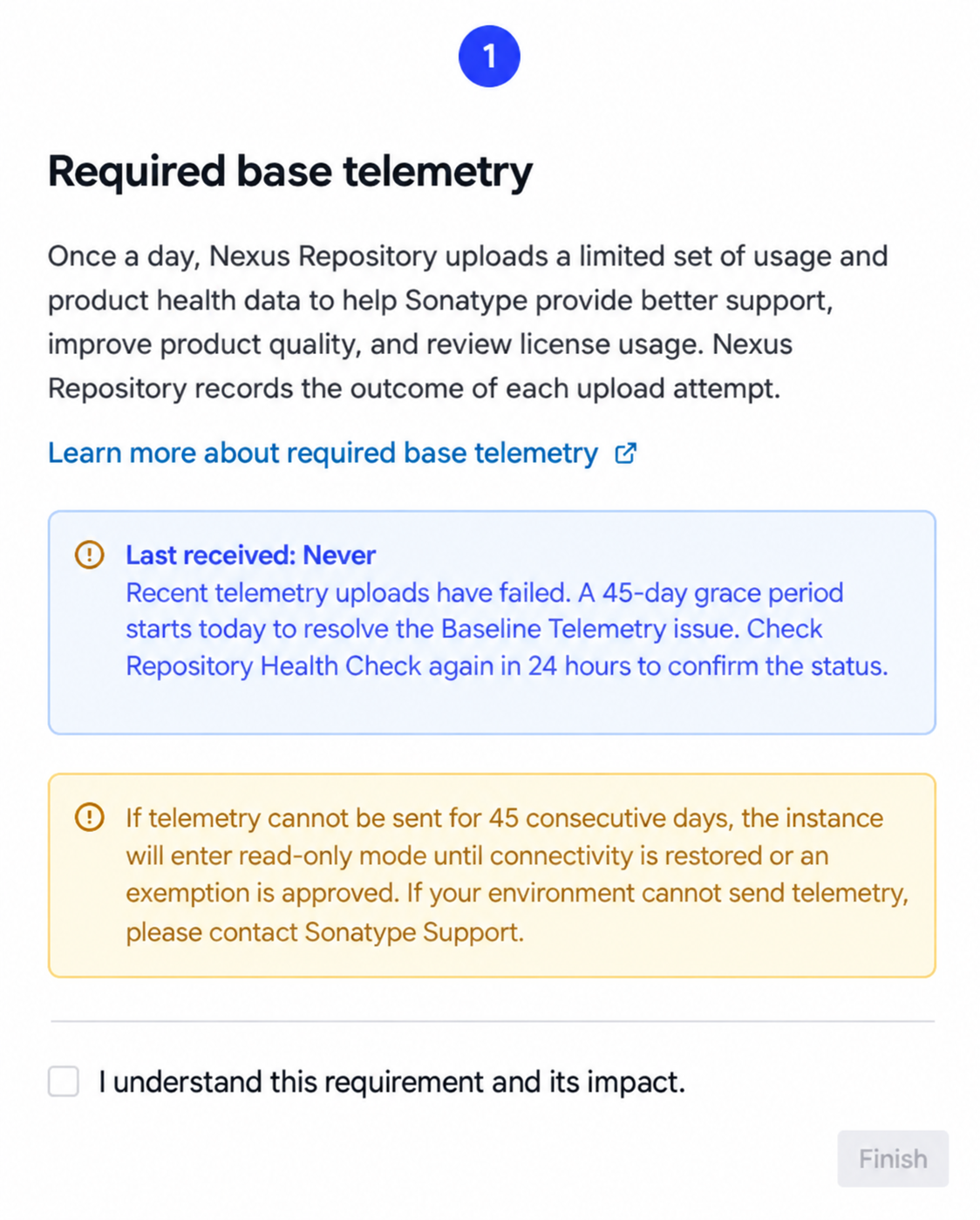
The acknowledgement records that an administrator understands the telemetry requirement and the effect of unsuccessful telemetry delivery. Acknowledgement is recorded once for the Nexus Repository instance. After it is recorded, administrators are not prompted to acknowledge the requirement again.
Required Base Telemetry Grace Period
Nexus Repository monitors required base telemetry delivery and provides a grace period when telemetry cannot be successfully uploaded. The grace period depends on the Nexus Repository edition:
Edition | Grace Period |
|---|---|
Community Edition | 10 days |
Pro Edition | 45 days |
During the grace period, Nexus Repository continues to operate normally. A Baseline Telemetry Upload Issue warning appears when upload failures require administrator attention and shows the remaining grace-period time.

To resolve a required base telemetry upload issue:
Verify that the Nexus Repository server can reach the required telemetry endpoints.
Run the Upload Retry task.
Review the Baseline Telemetry status under Settings → Status.
If telemetry still cannot be delivered, contact Sonatype Support.
After Nexus Repository successfully uploads required base telemetry, the telemetry warning is cleared.
Acknowledge Required Base Telemetry Through REST API
You can query or record the required base telemetry acknowledgement through the Nexus Repository REST API.
Method | Purpose |
|---|---|
| Returns whether required base telemetry has been acknowledged. |
| Records the required base telemetry acknowledgement. |
Both operations require authentication and the nexus:* permission. The endpoint is:
/service/rest/v1/system/mandatory-telemetry-acknowledgement
Status | Meaning |
|---|---|
| The |
| The acknowledgement was recorded successfully. |
| The |
| The authenticated user does not have the required permission. |
GET Example:
curl -u <username>:<password> \
  -X GET \
  https://<nexus-host>/service/rest/v1/system/mandatory-telemetry-acknowledgement
POST Example:
curl -u <username>:<password> \
  -X POST \
  -H "Content-Type: application/json" \
  -d '{"acknowledgement":true}' \
  https://<nexus-host>/service/rest/v1/system/mandatory-telemetry-acknowledgement
Refer to Nexus Repository API Reference page for more details.
Read Only Mode
If required base telemetry cannot be successfully uploaded within the applicable grace period, Nexus Repository enters read only mode.
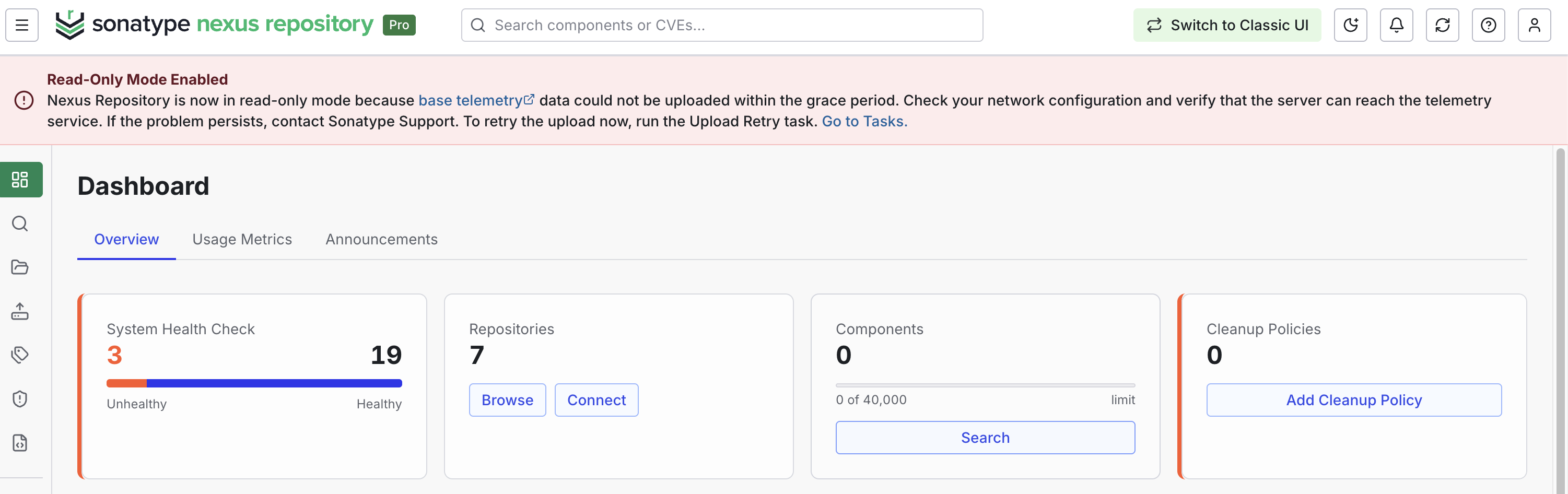
To restore normal operation, resolve the telemetry connectivity issue and successfully send required base telemetry. Run the Upload Retry task after restoring connectivity if you want to retry the upload immediately. See Tasks for more details. If your environment cannot send required base telemetry, contact Sonatype Support.
Configure a TLS-Intercepting Proxy
If your network uses a TLS-intercepting proxy, configure Nexus Repository to use the proxy and add the proxy’s certificate to the Nexus Repository trust store. Telemetry requests use the Nexus Repository trust store. Configuring the proxy without trusting its certificate can prevent telemetry uploads. These failures count toward the required telemetry grace period. If the failures continue through the grace period, Nexus Repository enters read-only mode.
Take the following steps to configure the proxy and certificate:
Configure the HTTP and HTTPS proxy settings.
Go to Settings → HTTP. Enable and configure the HTTP and HTTPS proxy settings for your environment. For more details, see HTTP Request and Proxy Settings.
Add the proxy's certificate to the Nexus Repository trust store.
Go to Settings → SSL Certificates, and add the certificate. You can load the certificate from a server or paste a PEM-encoded certificate. Review Configuring SSL for details.
Verify that the imported certificate is valid and includes the required certificate chain. Renew and replace it before it expires.
Confirm that Nexus Repository can upload telemetry. Review the telemetry status and logs for upload failures. If the failure continues, check the certificate chain, expiration date, hostname and confirm that both HTTP and HTTPS proxy settings are correct.
What Gets Sent?
This feature will collect anonymous, non-sensitive information on the general use of Nexus Repository.
Anonymous
We do not collect information that identifies specific users: no usernames, passwords, emails, hostnames, or URLs of any kind.
Non-Sensitive
This feature doesn’t collect identifying information on which you or your teams are working. We don’t collect repository names, component names, coordinates or paths, the names or content of content selectors or routing rules, or paths of any kind—anything that might inadvertently contain information about your organization’s projects or the components you’re using.
Configuration
We collect high-level configuration choices, feature usage rates, internal error frequency, and performance information. Are you using the S3 blob store support? Is it working well? Is it fast enough? Have you switched to NuGet v3, or is v2 still everywhere?
Environmental Details
We collect a limited amount of environmental information to help us understand nuts-and-bolts details like memory and thread pool efficiency. This also helps us understand how organizations are adopting cloud environments and when to expand support for the platforms where you deploy Nexus Repository.
Endpoints to Whitelist
Whitelist the following endpoints to ensure that your Nexus Repository instance can successfully send telemetry:
Community Edition Endpoints
https://nxrm.telemetry.sonatype.com/production/oss/ingest
https://nxrm.telemetry.sonatype.com/production/oss/v2/ingest
Nexus Repository Pro Endpoints
https://nxrm.telemetry.sonatype.com/production/ingest
https://nxrm.telemetry.sonatype.com/production/v2/ingest
Example Success and Error Logs
The samples below provide an example of what you can expect to see in the logs when telemetry is successfully sent or when it fails to send:
Success
Telemetry upload successfully with valid signature
Issues Validating Telemetry Payload Signature
Telemetry upload failed (signature verification). Status: {}, URL: {}Issues with Telemetry Content
Telemetry upload failed (client error). Status: {}, URL: {}, Response: {}Issues with Required Base Telemetry
This instance of Nexus Repository has been unable to upload required base telemetry data for the past {} days. This is a warning only. Your instance will continue to operate normally. Check that your server can reach the Sonatype telemetry service, then run the Upload Retry task. If your environment cannot send telemetry or the issue persists, contact Sonatype Support.Required Base Telemetry Not Acknowledged
Mandatory telemetry acknowledgement was not received. An administrator must acknowledge the mandatory telemetry notice from the Nexus Repository UI.
Feedback
While automated data is useful, we continue to rely on feedback from developers and DevOps professionals like you to truly understand how you’re using Nexus Repository and how well it meets your needs.
If you have questions or feedback about this program or any other aspect of Nexus Repository, please let us know in the Nexus Repository Manager category.